What Is a VPN Kill Switch (and Why You Want One)?
A kill switch is a safety net: if your VPN connection drops, it instantly blocks your internet so your real IP and data can't leak.
By Himanshu Bhatt· 5 min read· August 9, 2026
- A kill switch automatically blocks your internet if the VPN connection unexpectedly drops.
- This prevents your real IP address and unencrypted traffic from leaking during the gap.
- VPN connections do drop — switching networks, sleep/wake, server hiccups — so the safety net matters.
- There are two types: system-level (blocks everything) and app-level (blocks chosen apps only).
- It's essential for anyone who must never expose their real IP (e.g., torrenting, sensitive work).
On this page(show)(close)
A VPN kill switch is a safety feature that instantly cuts your device's internet connection the moment the VPN tunnel drops unexpectedly. The logic is simple and strict: no VPN, no internet. That way, in the split second your protection fails, your real IP address and unencrypted traffic never get the chance to spill out onto the network you were trying to hide from.
It helps to think of the VPN tunnel as an umbrella and the kill switch as the reflex that stops you walking if the umbrella suddenly blows inside-out. Most people assume a VPN connection, once on, simply stays on — but it doesn't always. When it briefly fails, your device doesn't just wait politely; it falls back to your normal, unprotected connection and keeps sending data. The kill switch exists to catch exactly that moment.
Why VPN connections drop in the first place
- Switching networks — moving from Wi-Fi to mobile data (or between Wi-Fi networks) forces the tunnel to rebuild.
- Waking from sleep — when your phone or laptop wakes, the VPN often needs a moment to reconnect.
- Weak or unstable signal — a patchy connection can knock the tunnel offline briefly.
- Server-side hiccups — the VPN server you're on can restart, get overloaded, or be rotated.
- App crashes or updates — the VPN client itself can restart, leaving a gap before it re-secures the connection.
What happens without a kill switch
During any of those drops, your apps don't stop working — they simply keep talking to the internet over your ordinary connection. For a few seconds (or longer, if you don't notice), the websites and services you're using can see your real IP address and your traffic travels unencrypted. If the whole point of your VPN was to keep your real location or activity hidden, that brief, silent gap can undo it completely — and you'd usually have no idea it happened.
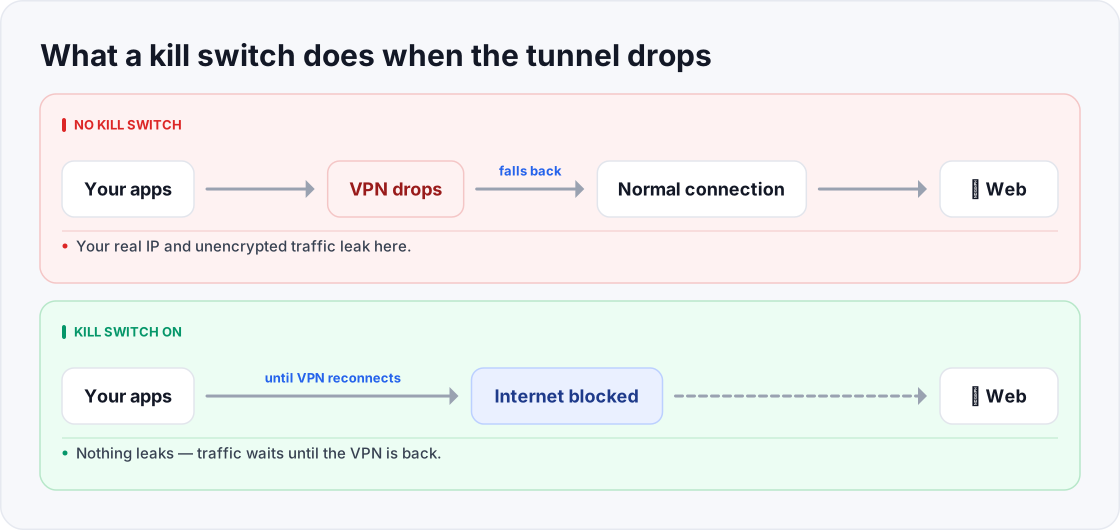
- Your real IP and unencrypted traffic leak here.
- Nothing leaks — traffic waits until the VPN reconnects, then flows again.
How it works: the two types
- System-level (device-wide) kill switch: blocks all internet for the entire device until the VPN reconnects. This is the strongest protection — nothing gets out unprotected, full stop.
- App-level kill switch: blocks the internet only for specific apps you choose (say, a torrent client or a browser), while the rest of the device stays online. Handy when you only need certain activities locked to the VPN.
When it matters most
For casual browsing on your home network, a one-second leak is low-stakes — a little privacy slip, quickly over. But for anyone whose rule is "my real IP must never be seen," a kill switch moves from nice-to-have to non-negotiable. That includes people torrenting (where your IP is visible to others sharing the same file), journalists and activists in high-surveillance environments, and anyone doing sensitive work where a single exposure has real consequences. The higher the stakes of a leak, the more essential the switch.
How to test your kill switch
- 1Connect your VPN and confirm you're online (load any website).
- 2Note your protected IP (search "what is my IP").
- 3With the VPN still on, manually disconnect the VPN server or turn off the VPN connection.
- 4If the kill switch works, your internet should immediately stop — pages won't load until the VPN reconnects.
- 5If pages keep loading and your real IP reappears, the kill switch isn't active — revisit the settings.
Quick glossary
- Kill switch — a feature that blocks internet access whenever the VPN connection unexpectedly drops.
- VPN tunnel — the encrypted connection between your device and the VPN server.
- Real IP — your device's actual public IP address, the one a VPN is meant to hide.
- Leak — any moment your real IP or unencrypted traffic escapes outside the tunnel.
- System-level kill switch — blocks internet for the whole device until the VPN reconnects; the strongest option.
- App-level kill switch — blocks internet only for the specific apps you select, leaving the rest online.
- Reconnect — the moment the VPN re-establishes the tunnel, after which traffic flows again, protected.
- Leak protection — the broader set of safeguards (kill switch, plus DNS and IPv6 handling) that stop your identity slipping out.
Frequently asked questions
- Does every VPN have a kill switch?
- Most reputable ones do, but not all — and it's frequently off by default. Check your app before relying on it.
- Will a kill switch slow me down?
- No. It only acts when the VPN drops; it has no effect on your normal speed the rest of the time.
- Why did my internet stop when the VPN disconnected?
- That's the kill switch doing its job — blocking traffic until protection is restored. It's a feature, not a fault.
- System-level or app-level — which should I use?
- System-level is safest because it covers everything. Choose app-level only if you deliberately want some apps to stay online outside the VPN.
- Is a kill switch enough to keep me fully private?
- It closes one important gap, but not all of them — a DNS leak, for example, can expose your browsing even while the tunnel is up. Pair it with leak protection.
- Does turning off my VPN myself trigger the kill switch?
- If you fully disable the VPN app itself, most kill switches stand down and restore your normal internet. The switch is designed to catch unexpected drops while the VPN is meant to be on — not a deliberate shutdown.
- My internet keeps cutting out with the kill switch on — why?
- An unstable connection that drops the tunnel repeatedly will repeatedly trigger the switch. Try a nearer or less-loaded server, or a more stable network; the switch is doing its job, but the underlying drops are the real problem.
- Should I always keep the kill switch on?
- For privacy-sensitive use, yes — it's the safety net that makes "always protected" actually true. If you only use a VPN casually at home, it's less critical, but there's little downside to leaving it enabled.
Where to go next
This article was produced with AI assistance for drafting/research. All facts have been verified and the final content has been reviewed and approved by a human editor.
Test Your Knowledge
Enjoying this guide?
TechToolsHQ is an independent, reader-supported tech platform. If this article saved you time, solved a tough problem, or helped you learn a new skill, consider supporting our work. Your support helps us keep our in-depth series 100% free and updated for everyone.
Don't miss the next deep-dive
Weekly breakdowns of the tools students and builders actually use.
No spam·Unsubscribe any time·Privacy-first