What Is a DNS Leak? (And How to Check for One)
The invisible flaw that exposes your browsing history—and how to check if your VPN has it.
By Himanshu Bhatt· 5 min read· August 9, 2026
- DNS is the internet's phonebook — it turns a domain name into an IP address.
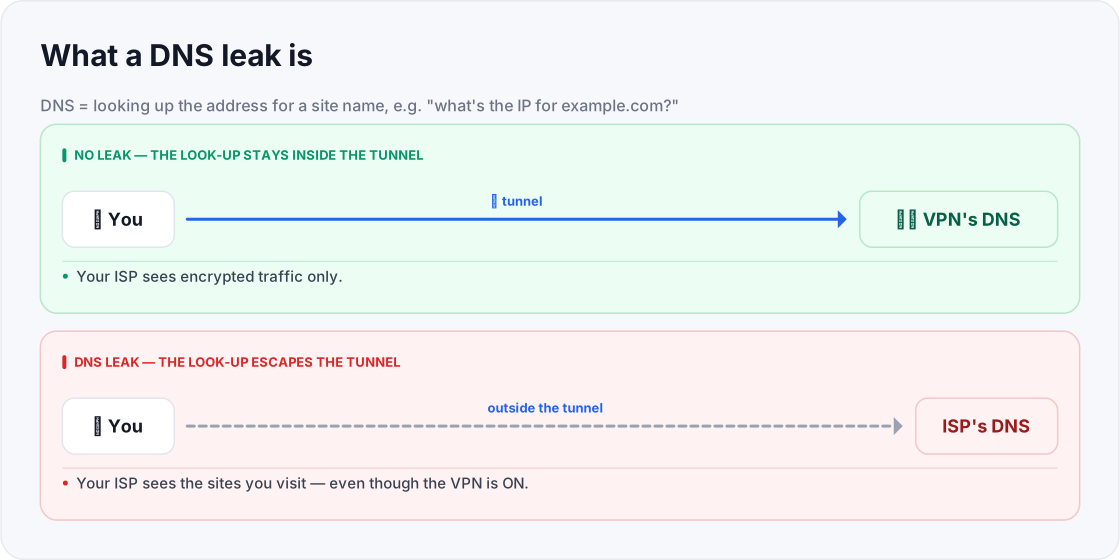
- A DNS leak means those look-ups travel outside the VPN tunnel, usually to your ISP's resolver.
- The result: your ISP can still see which sites you visit, even though your VPN is connected.
- Your traffic stays encrypted, but your destinations are exposed — which defeats a key reason for using a VPN.
- A good VPN routes DNS through its own servers and includes leak protection — and you can test it yourself.
On this page(show)(close)
DNS (Domain Name System) is the internet's phonebook: when you type a website name, DNS looks up the numerical IP address behind it. A DNS leak happens when those look-ups escape your VPN tunnel and go to a DNS server outside it — usually your ISP's. The consequence is quiet but serious: even with your VPN switched on, your ISP can still see a list of the sites you're visiting.
Here's the uncomfortable part: a DNS leak is invisible. Your VPN shows "connected," your traffic really is encrypted, and everything looks protected — while your browsing history quietly slips out a side door. It's like whispering inside a soundproof booth but shouting each address you want out the window first. The booth (your encrypted tunnel) works perfectly; it just isn't covering the one thing that reveals where you're going.
Why it defeats the point of a VPN
For many people, the whole reason to use a VPN is so their ISP can't see their browsing. But if DNS queries leak, the ISP gets exactly that — the domains you look up — no matter how strong your VPN's encryption is. Your traffic is scrambled; your destinations are not hidden. That gap is why DNS leaks are considered one of the most damaging VPN failures, and why a 2026 academic study of 281 free Android VPNs (presented at the NDSS security conference) singled them out — reporting that 24 of the apps leaked DNS, exposing users' browsing despite the VPN being on.
How leaks happen
- The OS uses its default resolver. Your operating system sends DNS queries to the resolver it was already set to, instead of the VPN's.
- The VPN doesn't force DNS through itself. A poorly built VPN app fails to capture all DNS look-ups and route them through its own servers.
- IPv6 slips around the tunnel. If the VPN only handles IPv4 but your network uses IPv6, those queries can bypass it.
- "Smart" or transparent DNS features intercept queries. Some networks or OS features quietly redirect DNS, sidestepping the VPN.
How a good VPN prevents it
Reputable VPNs run their own DNS servers and force every look-up through the encrypted tunnel, with built-in DNS leak protection that stops your operating system from going around them. Good apps also handle IPv6 correctly — either routing it through the tunnel or disabling it — so nothing slips out that side. When you're choosing a VPN, this is a specific feature to confirm, and exactly the kind of safeguard the low-quality free apps in that study often lacked.
How to test for a DNS leak
- 1Connect your VPN: and pick a server, ideally in a different region from where you really are.
- 2Run a reputable DNS-leak test: in your browser — well-established, neutral options include dnsleaktest.com, browserleaks.com/dns, and ipleak.net.
- 3Read the results: They show which DNS servers answered your look-ups and where they appear to be.
- 4Interpret it: if the servers or location match your VPN, you're fine. If they show your ISP or your real location, DNS is leaking.
- 5Re-test after any fix to confirm the leak is closed.
Quick glossary
- DNS — the system that turns a website name into the numeric IP address devices connect to.
- DNS resolver — the server that answers "what's the IP for this domain?" look-ups.
- DNS leak — when those look-ups travel outside the VPN tunnel, exposing the domains you visit.
- DNS leak protection — a VPN feature that forces all look-ups through its own servers inside the tunnel.
- IPv6 leak — traffic escaping via IPv6 when the VPN only protects IPv4.
- Resolver location — where the answering DNS server appears to be; a mismatch can reveal a leak.
- Transparent DNS — a network quietly intercepting and redirecting DNS look-ups, sidestepping your settings.
- IP leak — a related failure where your real IP address, not just your DNS, escapes the tunnel.
Frequently asked questions
- Can I have a DNS leak even with a paid VPN?
- It's less likely, but possible depending on your settings and OS. Testing is the only way to be sure.
- Does a DNS leak expose my passwords?
- No — it exposes which sites you visit, not the contents of what you do there. But that browsing history alone can be sensitive.
- How do I fix a DNS leak?
- Enable your VPN's DNS-leak protection, disable conflicting OS DNS or IPv6 settings, and re-test. If it persists, the VPN itself may be at fault.
- Is a DNS leak the same as an IP leak?
- No. An IP leak exposes your real IP address; a DNS leak exposes the domains you look up. Both can happen, and both defeat parts of a VPN's purpose.
- Does a kill switch stop DNS leaks?
- Not necessarily. A kill switch guards against the tunnel dropping; a DNS leak can happen while the tunnel is up. They're separate protections — you want both.
- How often should I test for a DNS leak?
- Test when you first set up a VPN, after any big update to the app or your operating system, and whenever you change DNS or network settings. A one-time pass isn't a permanent guarantee.
- Will a DNS leak show up as slow internet?
- No — that's what makes it dangerous. A leak is invisible in day-to-day use; everything works normally while your browsing quietly escapes. Only a test reveals it.
- Does pointing my device at a public DNS resolver prevent leaks?
- Not on its own. It changes who answers your look-ups, but if those queries still travel outside the tunnel, your ISP can see them. The real fix is routing DNS through the VPN.
- Can my phone leak DNS on mobile data too?
- Yes. DNS leaks aren't limited to Wi-Fi; the same misconfiguration can expose your look-ups on cellular. Test on the networks you actually use.
Where to go next
This article was produced with AI assistance for drafting/research. All facts have been verified and the final content has been reviewed and approved by a human editor.
Test Your Knowledge
Enjoying this guide?
TechToolsHQ is an independent, reader-supported tech platform. If this article saved you time, solved a tough problem, or helped you learn a new skill, consider supporting our work. Your support helps us keep our in-depth series 100% free and updated for everyone.
Don't miss the next deep-dive
Weekly breakdowns of the tools students and builders actually use.
No spam·Unsubscribe any time·Privacy-first