What Is End-to-End Encryption (E2EE)?
End-to-end encryption means only you and the person you're talking to can read your messages — not even the app company can.
By Himanshu Bhatt· 5 min read· August 9, 2026
- End-to-end encryption (E2EE) means only the two endpoints — sender and recipient — can read the content.
- Even the service provider carrying the message can't decrypt it.
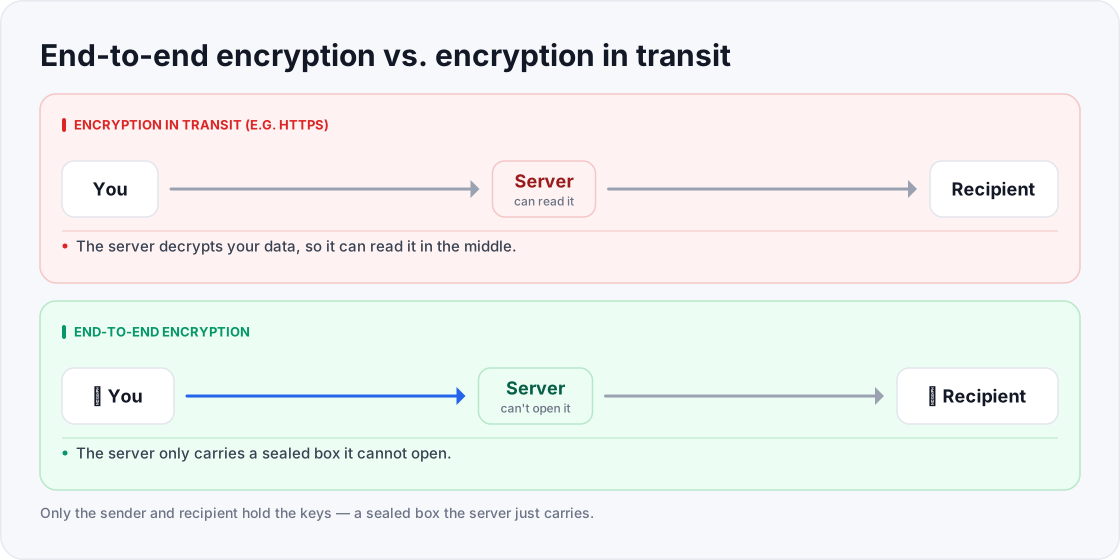
- This differs from encryption in transit (like HTTPS), where the server can read your data.
- It works because only the endpoints hold the keys that unlock the message.
- A VPN is not E2EE — it encrypts the trip to the VPN server, not the whole path to the person you're messaging.
On this page(show)(close)
End-to-end encryption (E2EE) is a way of protecting a message so that only the sender and the intended recipient can read it. The content is scrambled on your device and can only be unscrambled on the other person's device — which means the company running the service in between can't read it either, even if it wanted to, was hacked, or was legally compelled to hand something over.
The classic image is a sealed, tamper-proof envelope that only the recipient owns the key to. You lock your letter, hand it to the postal service, and the post carries it across the country without ever being able to open it — because they don't have the key, and neither does anyone who intercepts it along the way. Only the person it's addressed to can unlock it at the other end. That "no one in the middle can read it, not even the carrier" property is what makes E2EE special.
How it differs from "normal" encryption
Most web traffic uses encryption in transit — the padlock you see with HTTPS/TLS. That protects your data on the way to the server, but the server itself can decrypt and read it once it arrives (which it usually needs to, to show you your inbox or process your order). With end-to-end encryption, only the endpoints hold the keys, so the server is reduced to a courier carrying sealed boxes it can't open. In-transit encryption protects against eavesdroppers on the network; E2EE additionally protects against the service provider itself.
How the keys make it work
E2EE relies on a clever idea called a key pair. Each person has two matching keys: a public key they can share freely, and a private key they never reveal. Anything locked with your public key can only be unlocked by your matching private key. So when someone messages you, their app locks the message with your public key — and only your device, holding your private key, can open it. Because the private keys never leave the two devices, the server in the middle only ever handles locked content it has no way to read. You don't have to manage any of this by hand; the app does it invisibly.
Where you already use it
Private messaging apps are the most common example. Signal is the widely cited standard-bearer for E2EE, and its underlying Signal Protocol also powers end-to-end encryption in WhatsApp (integrated in 2016), Google Messages, and Facebook Messenger, among others. Beyond chat, E2EE also shows up in some email services, encrypted file storage, password managers, and certain video-call tools. The key question to ask of any "encrypted" service is who holds the keys — if the answer is "only you and the person you're talking to," it's end-to-end.
E2EE vs. a VPN (a common mix-up)
This trips people up constantly, so it's worth being precise: a VPN encrypts the traffic between your device and the VPN server — it does not provide end-to-end encryption all the way to the website or person you're communicating with. Once your traffic leaves the VPN server for its destination, the VPN's encryption ends. They solve different problems, and strong privacy often uses both at once.
| VPN | End-to-end encryption | |
|---|---|---|
| What it protects | Your connection from your device to the VPN server | The content of a message from sender to recipient |
| Who can't read it | Your ISP / snoops on your network | Anyone in the middle, including the service provider |
| Where protection ends | At the VPN server | Only on the recipient's device |
| Main job | Hide your traffic and location | Keep message content private end to end |
Quick glossary
- End-to-end encryption (E2EE) — only the sender and recipient can read the content; the service in between can't.
- Encryption in transit — protection on the network (e.g. HTTPS), but the server can still read the data.
- Endpoint — a device at either end of the conversation, where messages are locked and unlocked.
- Public key — a key you share freely; others use it to lock messages that only you can open.
- Private key — a secret key only you hold; it's the only thing that can unlock messages sent to you.
- Metadata — data about a message (who, when, how often) that E2EE may not hide.
- Plaintext / ciphertext — the readable message versus its scrambled, encrypted form.
- Key exchange — the process by which two devices safely agree on the keys they'll use.
Frequently asked questions
- Does a VPN give me end-to-end encryption?
- No. A VPN encrypts traffic to its server, not all the way to your recipient. They're complementary tools, not the same thing.
- Can the app company read my E2EE messages?
- With true end-to-end encryption, no — only the sender and recipient hold the keys that can unlock the content.
- Does E2EE hide who I message?
- It hides the content, but metadata like your contacts and the timing may still be visible depending on the service.
- Is HTTPS the same as end-to-end encryption?
- No. HTTPS protects data in transit to a server that can still read it; E2EE keeps content unreadable even to the server.
- If E2EE is so good, why doesn't everything use it?
- Many services need to read your data to provide the feature (search your email, scan for spam, sync across devices), which is incompatible with true E2EE. It's a deliberate trade-off, not an oversight.
- Can I turn on E2EE myself, or is it built in?
- It's built into the service — either it uses end-to-end encryption or it doesn't. Some apps offer it as an optional mode you switch on, so check the settings, because "encrypted" on the box doesn't always mean end-to-end.
- Is my email end-to-end encrypted?
- Usually not by default. Most mainstream email is encrypted in transit but readable by the provider. A few services offer true E2EE, sometimes only between users of the same service.
- If I lose my device, can I still read my E2EE messages?
- Only if you've backed up your keys or account securely. Because the keys live on your devices, losing them without a proper backup can mean losing access to old messages — the flip side of nobody else holding your keys.
Where to go next
This article was produced with AI assistance for drafting/research. All facts have been verified and the final content has been reviewed and approved by a human editor.
Test Your Knowledge
Enjoying this guide?
TechToolsHQ is an independent, reader-supported tech platform. If this article saved you time, solved a tough problem, or helped you learn a new skill, consider supporting our work. Your support helps us keep our in-depth series 100% free and updated for everyone.
Don't miss the next deep-dive
Weekly breakdowns of the tools students and builders actually use.
No spam·Unsubscribe any time·Privacy-first