Does a VPN Slow Down Your Internet? (Why, and How Much)
A VPN adds encryption and an extra hop, so some slowdown is normal — but with a nearby server and a modern protocol it's usually barely noticeable.
By Himanshu Bhatt· 5 min read· August 9, 2026
- Yes — a VPN adds encryption work and an extra routing hop, so some slowdown is expected.
- In practice it's often small and unnoticeable for browsing and streaming.
- The biggest factors: distance to the server, server load, the protocol, and your base speed.
- Occasionally a VPN can even avoid ISP throttling and feel faster for a specific service.
- Choosing a nearby server and a modern protocol (WireGuard) keeps the impact minimal.
On this page(show)(close)
Yes — using a VPN can slow your internet, because it does two things that take time: it encrypts your traffic, and it routes it through an extra server before it reaches its destination. But "slower" doesn't mean "slow." With a well-chosen server and a modern protocol, the difference is usually small enough that you won't notice it during normal browsing or streaming.
Think of your data as a car heading to a destination. A VPN adds two things to the journey: a quick security checkpoint where everything gets sealed and later unsealed (that's encryption), and a detour through the VPN server before continuing on (that's the extra hop). Neither has to be a big delay — a nearby checkpoint and a short detour barely change your arrival time — but they're never completely free, which is why some slowdown is normal and expected.
Why the slowdown happens
- Encryption overhead: scrambling and unscrambling your data takes a small amount of processing time on both ends.
- Extra distance (latency): your traffic detours through the VPN server, adding physical distance — the further the server, the longer the round trip.
- Server load: a crowded server shares its bandwidth among many users at once, which can drag speeds down at peak times.
- Protocol: a heavier protocol (like OpenVPN) can be a bit slower than a lean, modern one (like WireGuard).
The factors that decide how much
| Factor | Effect on Speed | What you can do |
|---|---|---|
| Server distance | The main driver of added latency | Pick a server close to you |
| Server load | Crowded servers slow down | Choose a low-load server; many apps show this |
| Protocol | Heavier protocols cost more speed | Use WireGuard where available |
| Your base speed | Slow connections feel the overhead more | Fix the base connection first |
| Wi-Fi vs wired | Wi-Fi adds its own variability | Use Ethernet for the most stable results |
How much, realistically?
For a good VPN on a nearby server, the drop is often modest — a small percentage of your base speed rather than a dramatic collapse. The further and busier the server, and the slower your base connection, the more you'll feel it. If your internet is already fast, you likely won't notice a VPN during normal use; if it's already slow, the VPN's overhead becomes more visible because there's less headroom to absorb it. It also helps to separate two things people lump together: latency (how responsive the connection feels, which the extra hop affects most) and bandwidth (raw download speed, which a well-chosen server barely dents). For everyday browsing, video, and music, a few extra milliseconds of latency is invisible — it's mainly competitive gamers and people already on marginal connections who notice the difference at all.
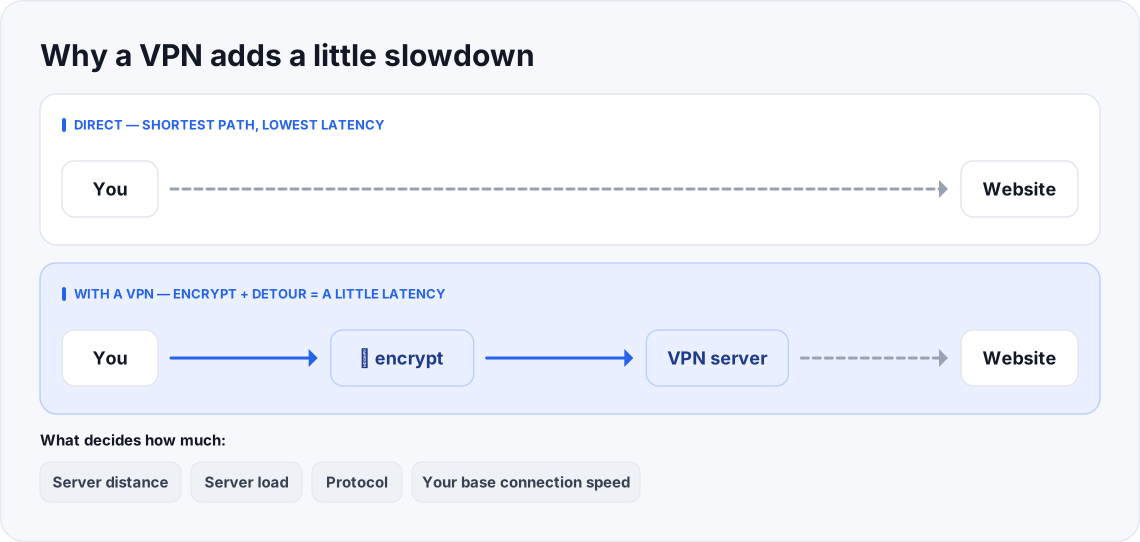
- A direct route — lowest latency.
- Encryption adds a little processing; the detour adds a little distance.
- Nearby server + modern protocol: the added cost is usually small.
- Distant, crowded server: the slowdown is much more noticeable.
How to keep it fast
- 1Pick a nearby server — the shortest detour means the lowest added latency. This is the single biggest lever.
- 2Use a modern protocol like WireGuard for less overhead.
- 3Avoid overloaded servers — many apps show server load or auto-pick the best one for you.
- 4Prefer a wired connection for stability when speed really matters.
- 5Check your base speed — run a test without the VPN first; if it's slow there, the VPN isn't the whole story.
When a VPN can actually feel faster
Occasionally a VPN improves speed for a specific service. If your ISP is deliberately throttling a certain kind of traffic — say, slowing video streaming or large downloads it can identify — a VPN hides that traffic inside the encrypted tunnel, so the ISP can't single it out to slow it down. In that narrow case you might see a streaming service run better with the VPN on. Outside of throttling, though, expect a small slowdown rather than a speed-up.
Quick glossary
- Latency (ping) — the delay for data to make a round trip; lower is snappier.
- Bandwidth — how much data your connection can carry at once, the "width" of the pipe.
- Throughput — the real-world speed you actually get after all the overhead.
- Encryption overhead — the small processing cost of scrambling and unscrambling your data.
- Server load — how many users are sharing a given VPN server's capacity at once.
- Protocol — the ruleset building the tunnel; lean ones like WireGuard cost less speed.
- Throttling — an ISP deliberately slowing specific traffic it can identify.
- Hop — each extra stop your data makes; a VPN adds one, which adds a little distance and latency.
Frequently asked questions
- Can a VPN ever make me faster?
- Occasionally — if your ISP is throttling a specific service, a VPN can hide that traffic and avoid the throttle. Otherwise, expect a small slowdown, not a speed-up.
- Why is my VPN so slow?
- Usually a distant or overloaded server, or a heavy protocol. Try a nearer server and switch to WireGuard.
- Does a faster internet plan fix VPN slowdown?
- It helps, but server distance and load matter just as much as your raw bandwidth — a fast plan through a far server still adds latency.
- Does the VPN slow everything, even local files?
- No — only your internet traffic routes through the tunnel. Copying files between devices on your own network isn't affected.
- Is a wired connection really faster with a VPN?
- It's more stable than Wi-Fi, which reduces speed dips — useful when you want consistent performance for streaming or calls.
- How much speed will I actually lose?
- For a nearby server on a modern protocol, often little enough that you won't notice during browsing or streaming. It grows with distance, server load, and a slower base connection, so there's no single number that fits everyone.
- Does the VPN slow my whole household or just my device?
- Only the devices actually running the VPN. If you install it on your router, everything behind that router shares the effect; on a single phone, only that phone is affected.
- Why does the same VPN feel fast one day and slow the next?
- Server load and the route your data takes change over time. A server that was quiet yesterday may be busy today — switching to a less-loaded or nearer server usually helps.
- Will a fast plan like fiber or 5G cancel out the slowdown?
- A fast base connection has more headroom to absorb the overhead, so the drop feels smaller — but distance and server load still add latency that no plan can fully remove.
Where to go next
This article was produced with AI assistance for drafting/research. All facts have been verified and the final content has been reviewed and approved by a human editor.
Enjoying this guide?
TechToolsHQ is an independent, reader-supported tech platform. If this article saved you time, solved a tough problem, or helped you learn a new skill, consider supporting our work. Your support helps us keep our in-depth series 100% free and updated for everyone.
Don't miss the next deep-dive
Weekly breakdowns of the tools students and builders actually use.
No spam·Unsubscribe any time·Privacy-first