How to Choose a Safe VPN: A Beginner's Checklist
After a 2026 study found most free VPNs leak data or track users, here's a simple 6-point checklist to pick one that actually protects you — audits, encryption, no-logs, leaks, jurisdiction, and price.
By Himanshu Bhatt· August 17, 2026

Prerequisites & What You Need Before Starting
- Know what a VPN is and what a VPN does NOT protect you from
- A web browser open with a neutral leak-test site (e.g., dnsleaktest.com or ipleak.net)
- 10 minutes to review the provider's privacy policy, audit history, and encryption standards
- Trust is the real spec: prioritize an independently audited no-logs policy.
- Insist on modern encryption (AES-256/ChaCha20, WireGuard/OpenVPN) — never Blowfish/3DES.
- Require a kill switch and test for DNS/IP leaks after connecting.
- Jurisdiction affects what a provider can be compelled to hand over.
- "Free" often means your data is the product — choose deliberately, and match the plan to your real use.
Choosing a VPN is less about picking the "fastest" and more about picking one you can trust with the exact traffic you're trying to hide. This checklist walks you through what actually matters.
Prioritize an independent, third-party no-logs audit
This is the single most important signal. A trustworthy VPN publishes public, third-party audit reports from established security or accounting firms (e.g., Cure53, PwC, Deloitte) verifying that user activity is never recorded. An unproven "no-logs" claim on a website homepage is just marketing copy. Read the actual privacy policy and confirm the audit's date and scope.
Demand modern encryption ciphers and protocols
Look for industry-standard AES-256 or ChaCha20 encryption carried by modern, open protocols like WireGuard or OpenVPN (with IKEv2 as an acceptable mobile fallback). Reject any provider that is vague about its security architecture or still relies on obsolete, broken ciphers such as Blowfish or Triple DES.
Require an automatic kill switch and leak protection
Strong encryption is useless if the tunnel leaks. Insist on a built-in kill switch (which cuts internet access if the VPN connection drops) and DNS/IPv6 leak protection. After connecting, run a neutral diagnostic test on dnsleaktest.com or ipleak.net — if your real ISP name or IP appears, the VPN is unsafe.
Understand the provider's operating jurisdiction
Where a VPN company is legally incorporated dictates what logs or customer records authorities can compel them to hand over. While everyday users should prioritize audits and leak tests first, high-risk users should seek privacy-friendly jurisdictions outside 5/9/14-Eyes surveillance alliances.
Vet the monetization model behind "free" services
Operating global server infrastructure is expensive. Safe free options are almost exclusively the limited, capped tiers of audited, paid brands using the free version to upsell subscriptions. If an anonymous standalone app promises unlimited free access with no paid business model, your browsing data is being monetized.
Match the server network and plan to your real use case
Choose a plan that fits your actual workflow — server locations for regional access, speed for streaming and downloads, and adequate simultaneous device allowances. Test the service using a monthly plan or money-back guarantee period before committing to a multi-year subscription.
On this page(show)(close)
Most "how to choose a VPN" advice fixates on speed and server counts. Those matter, but they're not what keeps you safe. Choosing a VPN is really a decision about trust — you're about to route all your traffic through one company's servers, so the real question is whether that company deserves it. This checklist walks through the six things that actually matter, in priority order, so you can see past the marketing and pick one you can rely on.
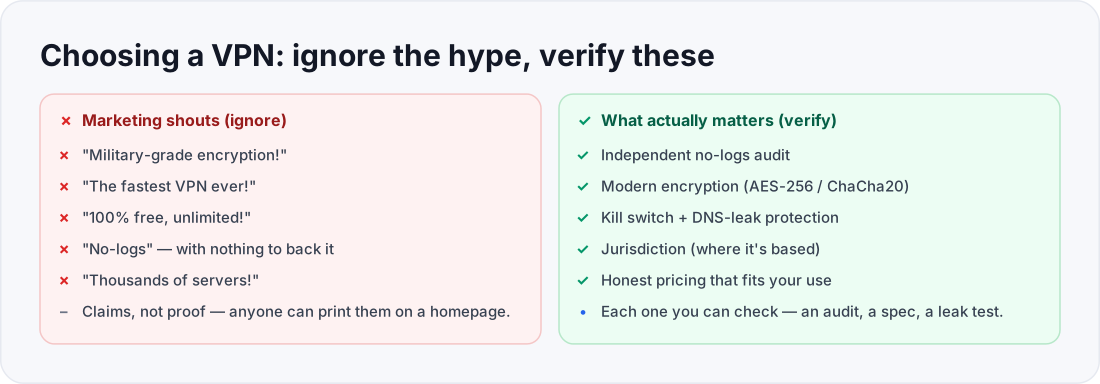
- "Military-grade encryption!"
- "The fastest VPN ever!"
- "100% free, unlimited!"
- "No-logs" with nothing to show
- Independent no-logs audit
- Modern encryption (AES-256)
- Kill switch + DNS-leak protection
- Jurisdiction and honest pricing
Step 1: Prioritize an independent no-logs audit
This is the single most important signal, so start here. A trustworthy VPN publishes independent, third-party audits confirming it doesn't log your activity — the inspection is done by outside firms (independent security auditors such as Cure53, or major accountancy firms), and the report is public. A no-logs claim with no audit behind it is just marketing copy. Read the actual privacy policy too, and check the audit's date and scope — a recent, repeated audit is far stronger than a single old one.
Step 2: Demand modern encryption and protocols
Look for AES-256 or ChaCha20 encryption carried by a modern protocol — WireGuard or OpenVPN (with IKEv2 as a fine third option). These are the current standards, and any reputable provider will state them plainly. If a provider is vague about its encryption, or you spot outdated ciphers like Blowfish or Triple DES — which the 2026 free-VPN study found in low-quality apps — walk away. Weak encryption is a false sense of security, which is worse than knowing you have none.
Step 3: Require leak protection (kill switch + DNS)
Strong encryption is undone by a leak. Require two safeguards: a kill switch (which blocks your internet if the VPN connection drops, so nothing escapes unprotected) and DNS/IP leak protection (which keeps your website look-ups inside the tunnel). Don't just take the provider's word — after connecting, run a reputable leak test such as dnsleaktest.com, browserleaks.com/dns, or ipleak.net. If it shows your real ISP or location, the VPN is leaking and fails this check.
Step 4: Understand the jurisdiction
Where a VPN company is legally based — and any data-sharing arrangements its country participates in — affects what it can be compelled to hand over. For most everyday users this is a secondary concern behind audits and leak protection; for journalists, activists, or anyone with a serious threat model, it moves up the list. You don't need to become a legal expert, but know the provider's home country before you commit, and weigh it against a strong, audited no-logs policy (which limits what exists to hand over in the first place).
Step 5: Be honest about "free"
Running VPN servers costs real money, so ask how a free option pays for itself. A genuinely safe free plan is almost always the limited free tier of an audited, paid provider using the free version to upsell you. An anonymous "100% free, unlimited" app with no company behind it is a red flag — the 2026 study found most free apps monetized through tracking and ads, the opposite of privacy. If you can't answer "how do they make money?" without the answer being "my data," keep looking.
Step 6: Match the plan to your real use
Once a provider passes the trust checks, pick the plan that fits how you'll actually use it. Streaming, torrenting, frequent travel, and everyday privacy weight things differently — server locations, speed, and how many devices you can connect at once. Choose for your real habits rather than the biggest number on the pricing page, and only commit to a longer, cheaper plan after you've tried the provider and trust it.
How to know you chose well (verification)
You've chosen a safe VPN when the provider clears the trust checks in order: a published independent no-logs audit, modern encryption, a kill switch plus a clean leak test, a jurisdiction you're comfortable with, an honest business model, and a plan that matches your use. If a provider stumbles on the top items — no audit, weak encryption, a leak — no amount of speed or server count makes up for it. Trust first, features second.
Frequently asked questions
- Is a more expensive VPN always safer?
- No — price doesn't equal trust. An audited no-logs policy and modern encryption matter far more than cost. Some excellent providers are mid-priced; some expensive ones are unremarkable.
- How do I test for a DNS leak?
- Connect the VPN, then use a reputable DNS-leak test site (dnsleaktest.com, browserleaks.com/dns, or ipleak.net). If it shows your ISP's servers or your real location, the VPN is leaking.
- Do I really need to care about jurisdiction?
- For casual privacy it's a minor factor behind audits and leak protection. For high-risk users it matters more. Either way, a strong audited no-logs policy limits what any jurisdiction could force a provider to reveal.
- Is a free VPN ever the right choice?
- A reputable provider's free tier can be fine for light use. An anonymous free app with no clear business model usually isn't — run it through the "how do they make money?" test first.
- How many "simultaneous devices" do I need?
- Count the devices you'd want protected at once (phone, laptop, tablet, maybe a router). Most people are fine with the standard allowance; heavy households should check the limit before buying.
Where to go next
Drafted with AI assistance, verified against the cited study and primary sources, and edited by TechToolsHQ staff.
Enjoying this guide?
TechToolsHQ is an independent, reader-supported tech platform. If this article saved you time, solved a tough problem, or helped you learn a new skill, consider supporting our work. Your support helps us keep our in-depth series 100% free and updated for everyone.
Get buying guides in your inbox
Practical, no-hype guides to choosing the right tech.
No spam·Unsubscribe any time·Privacy-first