How Does an IP Address Work? A Plain-English Guide
Your IP address is the "return address" every device gets online.
By Himanshu Bhatt· 5 min read· August 9, 2026
- An IP address is a unique number identifying your device on a network — like a return address for internet mail.
- Websites see your public IP, which reveals your approximate location and your ISP (not your exact home address).
- Behind your router, each device also has a private IP the wider internet never sees.
- Most home IPs are dynamic — your ISP can change them over time.
- A VPN replaces your public IP with the server's, hiding your real one from the sites you visit.
On this page(show)(close)
An IP (Internet Protocol) address is a unique number assigned to every device on a network so that data knows where to go — think of it as the return address on a piece of internet mail. Every time you load a website, send a message, or stream a video, your request carries an IP address so the reply knows exactly where to come back to.
Without addresses, the internet couldn't work at all — it would be like a postal system where no envelope had a destination or a sender. IP addresses are what let billions of devices find each other and swap data in the right direction. Most of the time this happens invisibly in the background; you only start caring about your IP when you realise it also quietly says something about you — roughly where you are, and who provides your internet.
What your IP address reveals about you
Your public IP address — the one the outside internet sees — gives away two useful things: your rough geographic location (usually city or region level, not your street) and which internet provider you use. That's how websites show you local content and a nearby language by default, and it's also how advertisers and trackers can tie browsing activity to a general location. Hiding this connection between "what I do online" and "roughly where and who I am" is the single most common reason people install a VPN.
How your data actually finds you
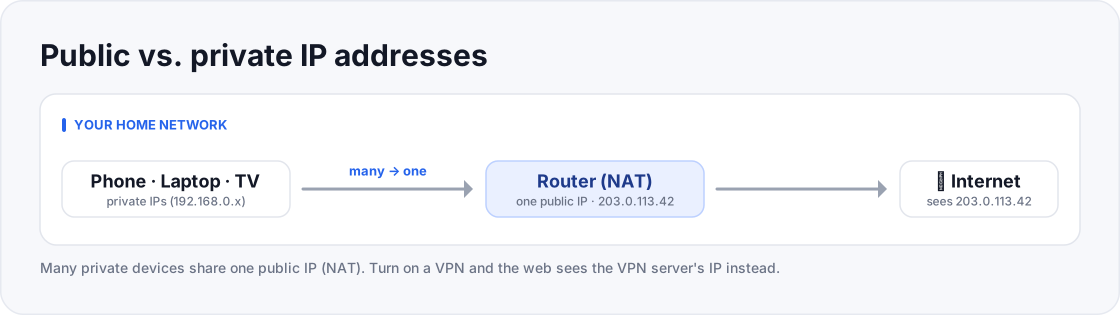
- Private IPs like 192.168.0.5 sit behind one public IP: 203.0.113.42.
- The website sees 203.0.113.42, and replies come back to it.
- The website sees the VPN server's IP, not 203.0.113.42.
- Your ISP sees only encrypted traffic going to a VPN.
Public vs private IP addresses
Here's a detail that surprises beginners: you actually have two kinds of IP address at once. Your public IP is assigned to your home router by your ISP and is shared by every device in your house — it's what the wider internet sees. Behind the router, each device (your phone, laptop, smart TV) gets its own private IP on your home network, which the outside internet never sees. The router performs a trick called NAT (Network Address Translation) to juggle all those private devices behind the one public address, keeping track of which reply belongs to which device.
IPv4 vs IPv6
- IPv4 — the classic format: four numbers from 0–255 separated by dots, like 203.0.113.42. It allows about 4.3 billion unique addresses (2³²) — a pool the world effectively exhausted when the last large blocks were handed out around 2011.
- IPv6 — the newer, far larger format written as longer strings of hexadecimal separated by colons. It was created to solve that shortage, and its 128-bit space (2¹²⁸ ≈ 340 undecillion addresses) is so vast it's effectively unlimited for the foreseeable future.
- Why you rarely notice — most people never type either kind by hand; your devices, router, and ISP negotiate all of this automatically.
Who gives you your IP address?
Your ISP (Internet Service Provider) hands out your public IP, usually through an automatic system called DHCP that leases an address to your router and renews it over time. Most home connections get a dynamic IP that can change periodically — reboot your router or wait a while and it may be different. A static IP that never changes is usually a paid add-on aimed at servers or businesses. Because your ISP controls and assigns this number, it can also link the sites you visit back to your account — which is exactly why ISP tracking is a privacy concern, and why the next spoke in this cluster is all about ISPs.
How a VPN changes the picture
When you connect to a VPN, your traffic leaves the tunnel from the VPN server's IP address instead of your own. Websites then see the server's location and provider rather than yours, so your real IP — and the rough location attached to it — stays hidden from the sites you visit. Meanwhile your ISP can see only that you're connected to a VPN, not the individual pages behind it. That's the core mechanism behind "a VPN hides your location": it doesn't erase your IP, it swaps the one the world sees.
Quick glossary
- IP address — a unique number identifying a device on a network; its "return address" for data.
- Public IP — the address your router shows the wider internet; shared by all the devices in your home.
- Private IP — the address your router gives each device on your home network; invisible outside it.
- IPv4 — the classic four-number format (e.g. 203.0.113.42); about 4.3 billion addresses in total.
- IPv6 — the newer, vastly larger format built to solve IPv4's shortage.
- ISP — your Internet Service Provider, the company that assigns your public IP.
- Dynamic IP — a public IP that can change over time; typical for home connections.
- Static IP — a public IP that stays fixed; usually a paid option for servers or business use.
- DHCP — the automatic system that leases IP addresses to devices and routers.
- NAT — the router trick that lets many private devices share one public IP.
- Geolocation — estimating a rough location from an IP; usually city or region level, not a street.
Frequently asked questions
- Can someone find my home from my IP address?
- Not precisely. An IP typically maps to a city or region and your ISP, not a street address. Precise location comes from other signals like GPS or data you share.
- Does my IP address change?
- Usually yes — most home connections use dynamic IPs that your ISP can rotate over time, especially after a router restart.
- How do I find my own IP address?
- Searching "what is my IP" shows your public one; your device's network settings show its private one on the home network.
- Can two devices have the same IP address?
- On the public internet, no two devices should share a public IP at once — but many devices in your home share your single public IP thanks to NAT, each with its own private IP.
- Does a VPN give me a new IP?
- Yes. Websites see the VPN server's IP instead of your real one, which is the core of how a VPN hides your location.
- What's the difference between IPv4 and IPv6, in practice?
- For everyday use, almost none — your devices handle both automatically. IPv6 mainly exists because the world ran out of the roughly 4.3 billion IPv4 addresses, and its far larger space means every device can have its own address again.
- Can I change my IP address myself?
- Often yes. Restarting your router can get you a new dynamic IP from your ISP, and connecting to a VPN gives you a different public IP entirely. A static IP, by contrast, is meant to stay the same.
Where to go next
This article was produced with AI assistance for drafting/research. All facts have been verified and the final content has been reviewed and approved by a human editor.
Test Your Knowledge
Enjoying this guide?
TechToolsHQ is an independent, reader-supported tech platform. If this article saved you time, solved a tough problem, or helped you learn a new skill, consider supporting our work. Your support helps us keep our in-depth series 100% free and updated for everyone.
Don't miss the next deep-dive
Weekly breakdowns of the tools students and builders actually use.
No spam·Unsubscribe any time·Privacy-first