What Is an ISP (Internet Service Provider)?
Your ISP is the company that connects you to the internet — and, by default, can see which sites you visit.
By Himanshu Bhatt· 5 min read· August 9, 2026
- An ISP (Internet Service Provider) is the company that provides your internet access — home broadband or mobile carrier.
- Every request you make online passes through your ISP first.
- It assigns your public IP and, by default, can see the domains you visit (via DNS).
- In some places, ISPs can log and even sell anonymized browsing data, or throttle certain traffic.
- A VPN encrypts your traffic so your ISP sees only that you're connected to a VPN, not the sites behind it.
On this page(show)(close)
An ISP, or Internet Service Provider, is the company that connects you to the internet — your home broadband or fiber company, or your mobile carrier when you're on cellular data. It's the on-ramp between your devices and the wider web: every request you make online passes through your ISP first, which is what makes it both essential to daily life and, from a privacy standpoint, worth understanding.
Think of your ISP as the company that owns the road leading out of your driveway. You can't reach anywhere on the internet without driving down it — and because every car leaves from your address and travels their road, they're in a natural position to notice where you're going. That visibility isn't sinister by itself; it's how the internet reaches you. But it's the reason "what can my ISP see?" is one of the first real privacy questions beginners ask.
What an ISP actually does
- Connects you to the internet — the physical or wireless link that gets you online in the first place.
- Assigns your public IP address — the "return address" websites use to send data back to you.
- Routes your requests — it looks up website addresses (via DNS) and forwards your traffic toward its destination.
- Manages your connection — bandwidth, data allowances, and the overall quality of your service.
What your ISP can see
Because all your traffic flows through it, your ISP can see which websites you connect to — most directly through DNS, the system that translates a name like example.com into the numerical address your device actually connects to. Even when a site uses HTTPS (which hides the contents of a page — your messages, passwords, and the specific pages you view), your ISP can typically still see the domain you visited and when: it's exposed both by those DNS look-ups and by a field in the connection's setup (the TLS "SNI"), unless you're using encrypted DNS and newer privacy features that aren't yet universal. On top of that, it knows your account identity, your assigned IP, and roughly how much and how often you browse.
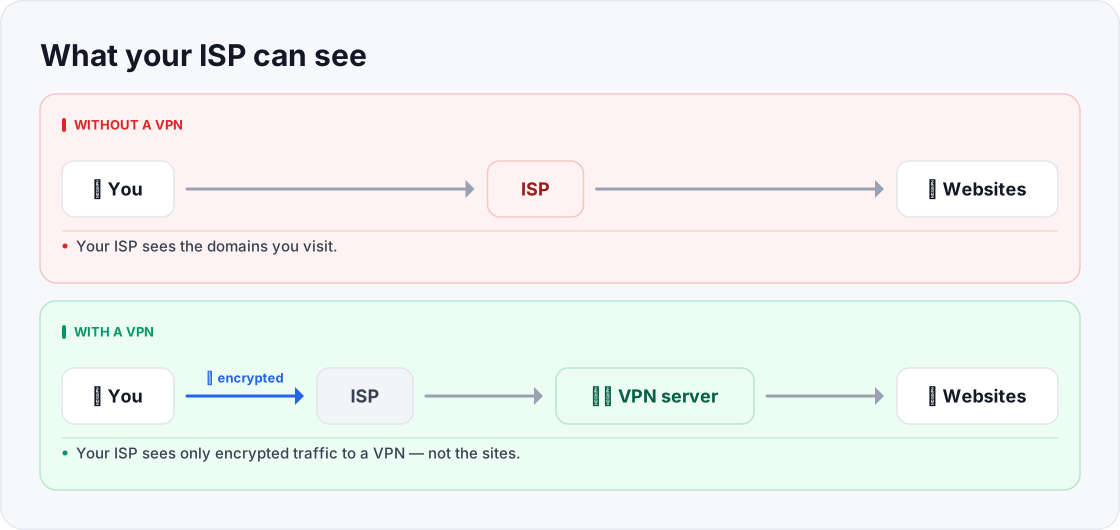
- Your ISP sees the domains you visit, your IP, and when and how much you browse.
- Your ISP sees only encrypted traffic to a VPN — not the sites.
Why that matters
- Logging & data sales: in some countries and under some plans, ISPs may retain browsing records and sell anonymized or aggregated data to advertisers. The rules vary widely by region.
- Throttling: an ISP can deliberately slow specific kinds of traffic it can identify — video streaming or large downloads, for example — especially near a data cap.
- Legal compliance: ISPs can be legally required to hand over records to authorities under the laws of their country.
- Targeted pricing & profiling: browsing patterns can, in some markets, feed profiles used for advertising.
How a VPN limits your ISP's view
A VPN encrypts your traffic before it ever leaves your device and routes it to a VPN server. Your ISP can still see that you're online and connected to a VPN, and how much data you're moving — but it can no longer read your traffic or see the individual sites you visit. It also stops handling your DNS lookups, so that window into your browsing closes too (assuming the VPN handles DNS properly — see the DNS-leak spoke). This is why "stop my ISP from logging my browsing" is one of the most common reasons people install a VPN.
Quick glossary
- ISP — Internet Service Provider, the company that connects you to the internet.
- DNS — the system that turns website names into the numeric addresses devices connect to.
- HTTPS — encryption that hides a page's contents in transit, though the domain can still be visible.
- Public IP — the address your ISP assigns you, which websites see and reply to.
- Throttling — an ISP deliberately slowing certain types of traffic it can identify.
- Bandwidth — how much data your connection can carry, often what your plan's "speed" refers to.
- Data cap — a monthly limit on how much data you can use before slowdowns or extra charges.
- Resolver — the DNS server that answers your device's "what's the address for this site?" look-ups.
Frequently asked questions
- Can my ISP see what I search on Google?
- It can see that you connected to Google and the domains you visit, but HTTPS hides the specific page contents and search terms from it.
- Does a VPN hide my browsing from my ISP?
- Yes — with a VPN on, your ISP sees encrypted traffic to a VPN server, not the individual sites behind it.
- Is my mobile carrier an ISP?
- Yes. Your cellular data provider is an ISP for your phone, with the same kind of visibility into your traffic as a home provider.
- Can my ISP throttle my Netflix or gaming?
- It can slow traffic it can identify, which is one reason people use a VPN — though a VPN isn't a guaranteed fix and can add its own small overhead.
- If I use incognito mode, can my ISP still see my browsing?
- Yes. Incognito only stops your browser from saving history locally; your ISP still sees the domains you visit. A VPN, not incognito, is what limits the ISP's view.
- Can I stop my ISP from selling my data?
- Options depend on where you live and your provider's policies, but a VPN is the most direct technical step — it stops your ISP from seeing the sites you visit in the first place. Some regions also offer formal opt-outs.
- Does changing my DNS to a public resolver hide me from my ISP?
- It can move your look-ups away from the ISP's own DNS, but your ISP can still see the IP addresses you connect to. For real concealment of your destinations, a VPN is the stronger tool.
- Is my home Wi-Fi the same as my ISP?
- No. Your home Wi-Fi is your local network; the ISP is the company that connects that network to the wider internet. Both can see traffic, but they're different links in the chain.
Where to go next
This article was produced with AI assistance for drafting/research. All facts have been verified and the final content has been reviewed and approved by a human editor.
Test Your Knowledge
Enjoying this guide?
TechToolsHQ is an independent, reader-supported tech platform. If this article saved you time, solved a tough problem, or helped you learn a new skill, consider supporting our work. Your support helps us keep our in-depth series 100% free and updated for everyone.
Don't miss the next deep-dive
Weekly breakdowns of the tools students and builders actually use.
No spam·Unsubscribe any time·Privacy-first