VPN vs. Proxy: What's the Difference (and Which Do You Need)?
A proxy reroutes one app's traffic; a VPN encrypts everything on your device.
By Himanshu Bhatt· 5 min read· August 9, 2026
- A proxy reroutes traffic for a single app (usually a browser) and typically does not encrypt it.
- A VPN encrypts all traffic on your device at the operating-system level.
- Both can change the IP a website sees, but only a VPN protects the data in transit.
- A proxy works app-by-app; a VPN works device-wide, so nothing leaks around it.
- A free proxy is fine for a quick region switch — not for privacy or security.
On this page(show)(close)
The short version: a proxy changes the IP address for one app's traffic — usually your web browser — and usually leaves that traffic unencrypted, while a VPN encrypts all of your device's traffic and routes it through a secure server. Both can make a website think you're somewhere else, but only the VPN actually protects what you're sending along the way.
That single difference — encryption, and how much of your device it covers — is the whole story. A proxy is a detour sign for one app: it changes where your requests appear to come from, but it doesn't lock them up, and it ignores everything else running on your device. A VPN is an armored tunnel for the entire machine: every app rides through it, and the contents are sealed. Once you see it that way, choosing between them becomes obvious.
How a proxy works
A proxy server sits between one application and the internet and forwards that app's requests, so the destination website sees the proxy's IP address instead of yours. Because it's configured per app, your browser might use the proxy while your email client, your app updates, and everything else connect directly — completely bypassing it. That's the key limitation: a proxy only redirects what you specifically point at it.
There are a few common flavours. HTTP proxies handle web traffic only; SOCKS proxies are more general-purpose and can carry other kinds of traffic; and transparent proxies are ones a network (like an office or school) puts in place without you configuring anything. Crucially, a plain proxy typically doesn't encrypt your traffic — it just relays it — so anyone positioned between you and the proxy can still read what you're sending.
How a VPN works
A VPN operates at the operating-system level, which means it captures traffic from every app on your device — browser, email, messaging, background services — encrypts it, and sends it through a secure tunnel to the VPN server. You don't configure it app by app; you flip one switch and the whole device is covered. The website you reach sees the VPN server's IP, and anyone watching your network sees only scrambled data heading to a VPN.
That "whole device + encryption" combination is what makes a VPN safe on hostile networks like public Wi-Fi. Even if something on your device quietly phones home in the background, it still rides through the encrypted tunnel rather than leaking out in the clear. A proxy can't make that promise, because it never sees that traffic in the first place.
The paths, side by side
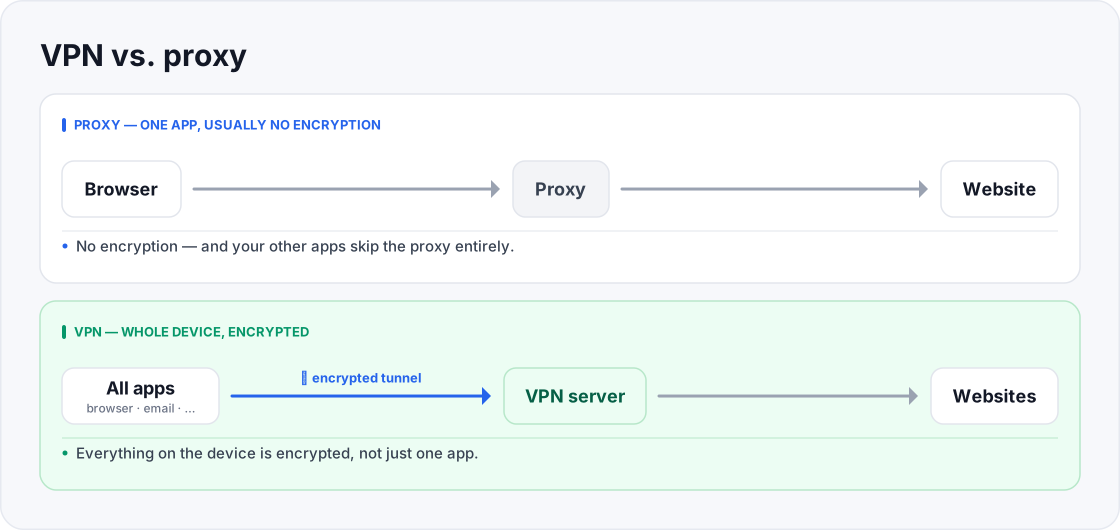
- It reroutes one app; your other apps skip it entirely.
- A snoop on your network can still read the browser traffic.
- Everything on the device is encrypted, not just one app.
- A snoop sees only encrypted data going to a VPN.
Feature comparison
| Proxy | VPN | |
|---|---|---|
| Scope | One app (e.g., browser) | Whole device, every app |
| Encryption | Usually none | Yes (e.g., AES-256 / ChaCha20) |
| Hides IP from websites | Yes | Yes |
| Protects on public Wi-Fi | No | No |
| Setup | Per app, manual | One app, one switch |
| Typical speed | Sometimes slightly faster (no encryption) | Small overhead from encryption |
| Best for | A quick, low-stakes region switch | Privacy, security, everyday use |
Quick glossary
- Proxy — a middle server that forwards one app's traffic so websites see its IP address instead of your real one.
- HTTP proxy — a proxy that handles web (browser) traffic specifically, and nothing else on your device.
- SOCKS proxy — a more general-purpose proxy that can relay other kinds of traffic, not just web pages.
- Transparent proxy — one a network (an office or school) puts in place automatically, without you configuring anything.
- Encryption — scrambling your data into unreadable code so that intercepted traffic is useless to a snoop.
- Tunnel — the encrypted path a VPN builds between your device and its server that outsiders can't see into.
- OS-level — working across the whole operating system, so every app on the device is covered at once, not just one.
So which do you actually need?
Reach for a proxy when…
- You just want one app (usually a browser) to appear to be in another region for a quick, non-sensitive task.
- You're on a network you already trust and privacy isn't the point.
- Speed on that single app matters more than protecting the data.
Reach for a VPN when…
- You're on public or shared Wi-Fi and want your traffic encrypted.
- You want everything on your device protected, not just one app.
- Privacy from your internet provider, or security in general, is the goal — which, honestly, is most of the time.
Common misconception
Frequently asked questions
- Is a proxy faster than a VPN?
- Sometimes slightly, because it skips encryption — but that missing encryption is exactly why it's less safe. The speed you save is protection you lose.
- Can a proxy protect me on public Wi-Fi?
- No. Without encryption, anyone eavesdropping on the network can still read your traffic. Use a VPN for public Wi-Fi.
- Does a VPN include a proxy?
- In effect, yes — a VPN does what a basic proxy does (masking your IP) and adds encryption across every app, so it covers the proxy's job and then some.
- My browser has a "proxy" or "VPN" extension — which is it?
- Many browser "VPN" extensions are really proxies: they only cover that browser, not your whole device. Check whether it encrypts and whether it protects other apps.
- Can I use both at once?
- You can, but for most people it adds complexity without benefit. A good VPN already covers what you'd want a proxy for.
- Do proxies hide my IP from my ISP?
- Not really. A proxy changes the IP that websites see, but because a plain proxy doesn't encrypt anything, your internet provider can still see where your traffic is heading. A VPN, by encrypting everything, hides that from your ISP too — which is a big part of why people choose one.
- Are proxies dangerous?
- Not inherently — a proxy is a legitimate tool for the narrow job of changing one app's apparent location. The risk is trusting an unknown free proxy with unencrypted traffic, or mistaking a proxy for the real privacy a VPN provides.
- Can a website tell I'm using a proxy or a VPN?
- Sometimes. Some sites detect and block known proxy or VPN IP addresses, which is why a connection that worked yesterday can suddenly be refused today. It affects both tools, and it tends to be an ongoing cat-and-mouse game.
Where to go next
This article was produced with AI assistance for drafting/research. All facts have been verified and the final content has been reviewed and approved by a human editor.
Test Your Knowledge
Enjoying this guide?
TechToolsHQ is an independent, reader-supported tech platform. If this article saved you time, solved a tough problem, or helped you learn a new skill, consider supporting our work. Your support helps us keep our in-depth series 100% free and updated for everyone.
Don't miss the next deep-dive
Weekly breakdowns of the tools students and builders actually use.
No spam·Unsubscribe any time·Privacy-first