What Does a VPN NOT Protect You From? 5 Big Misconceptions Explained
A VPN encrypts your connection and hides your IP address, but it won't stop phishing, malware, account tracking, or data you type into websites.
By Himanshu Bhatt· 5 min read· August 8, 2026

- A VPN encrypts your connection and hides your IP address, but it is not an all-in-one cybersecurity shield.
- VPNs cannot protect you against malware, virus downloads, or fraudulent phishing websites.
- Websites still track you when you log in to accounts, accept cookies, or share your identity.
- A VPN protects the pipe your data travels through, not what happens inside the sites and apps you use.
- Strong passwords, 2FA, password managers, and antivirus are still essential alongside a VPN.
On this page(show)(close)
A VPN does not protect you from threats that live inside the websites and apps you use — malware, phishing scams, tracking after you log in, company data breaches, or the fallout from a weak password. It's one of the most effective tools for privacy on public Wi-Fi and for hiding your IP address from your internet provider, but aggressive marketing has spread a myth that a VPN is magic armor against every online danger. It isn't — and a 2026 study of 281 free Android VPNs made that newly urgent, since many of those apps didn't even deliver the protection they did advertise.
Here's the mental model that clears up almost every misconception: a VPN protects the road your data travels on — not the destination. It builds an encrypted tunnel so nobody between you and the VPN server can read your traffic or see your location. But once your data arrives at a website, the VPN's job is done. If the destination itself is malicious (a fake login page), or you willingly identify yourself (by signing in), or the danger is a file you downloaded, the encrypted road did its job perfectly and you're still exposed. Keep that "road vs. destination" split in mind and the five myths below fall into place.
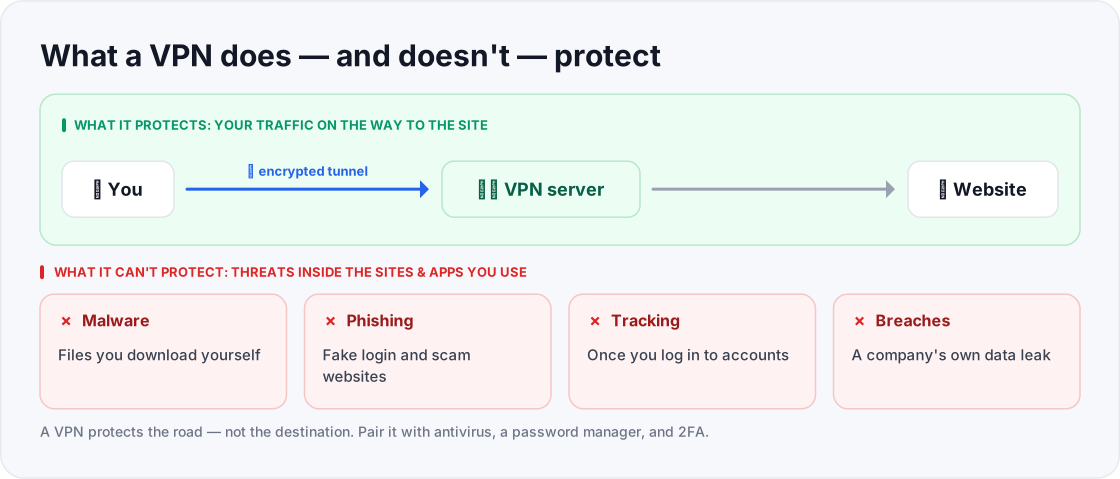
- Malware you download
- Phishing / fake websites
- Tracking once you log in
- Company data breaches
- Your traffic to the site
- Your real IP address
- Encryption on the way there
- Safety on public Wi-Fi
Malware, viruses, and ransomware downloads
If you click a malicious link and download a file laced with a virus, Trojan, or ransomware, your VPN will happily encrypt that download and deliver it to your device at full speed. Encryption doesn't mean inspection — a VPN never looks at the contents of what you download, so a threat wrapped in the tunnel arrives just as intact as the road promised. Picture ordering a parcel through a secure courier: the courier guarantees nobody tampers with the box in transit, but it won't warn you that you ordered something dangerous in the first place. What actually protects you: built-in OS security (Windows Defender, macOS Gatekeeper) or dedicated antivirus, plus not opening files from sources you don't trust.
Phishing scams and fake websites
Phishing is when an attacker tricks you into visiting a counterfeit website — a fake banking portal, a lookalike login page, a "your account is locked" email link — to harvest your credentials. Because a VPN only secures the connection, it will faithfully and privately connect you to the scammer's site, encryption and all. The tunnel can't tell an honest destination from a fraudulent one. What actually protects you: slowing down to check the real URL before typing anything, and a password manager — because it will refuse to auto-fill your saved login on a domain that doesn't exactly match the real one, which is often the first sign a site is fake.
Tracking when you log in to accounts
A VPN masks your real IP address, but that's only one of the ways you're identified online. Websites track you primarily through cookies, account logins, and device fingerprinting. Switch on a VPN, then sign into Google, Amazon, or Instagram, and those platforms know exactly who you are — you just told them. The VPN still protects you from a local eavesdropper on the café Wi-Fi, but the service you logged into records your activity under your own profile regardless of which country your IP appears to be in. What actually protects you: logging out when you don't need to be signed in, using privacy-focused browser settings or extensions, and declining non-essential cookies.
Server-side data breaches
When you hand your details to a retailer, bank, or social network, that data lives in their database — and a VPN has zero control over how they store or secure it. If that company suffers a breach, your information can be exposed no matter how carefully you connected to them. A VPN secures data in transit (on the road); it can't protect data at rest on someone else's servers. What actually protects you: using a unique password per site so one breach can't unlock the others, and a breach-monitoring service that alerts you when an account of yours appears in a known leak.
Weak passwords and stolen credentials
Reusing one simple password across sites is the single easiest way to get compromised, because it exposes you to credential stuffing — attackers taking a username/password pair leaked from one breach and trying it automatically across hundreds of other services. If a criminal already has your password, your VPN can't stop them from calmly logging in as you; from the site's point of view, nothing looks wrong. What actually protects you: a password manager to generate a long, unique password for every account, and two-factor authentication (2FA) so a stolen password alone still isn't enough to get in.
Quick glossary
| Term | What it means |
|---|---|
| Malware | Malicious software — viruses, Trojans, ransomware — built to damage, spy on, or hijack your device. |
| Phishing | A scam that tricks you into entering your credentials on a fake site or reply. |
| Cookie | A small file a website stores in your browser to recognise you on future visits. |
| Device fingerprinting | Identifying you from your device's unique blend of settings, even without cookies. |
| Credential stuffing | Automatically trying leaked username/password pairs across many sites at once. |
| Data breach | When a company's stored data is exposed or stolen from their own servers. |
| 2FA (two-factor authentication) | A second login step (a code or app prompt) so a stolen password alone isn't enough. |
Summary: what a VPN can vs. cannot do
| Feature / Threat | Does a VPN protect you? | Correct tool needed |
|---|---|---|
| Public Wi-Fi eavesdropping | ✅ YES | VPN |
| Hiding IP address from your ISP | ✅ YES | VPN |
| Masking your location | ✅ YES | VPN |
| Malware & virus downloads | ❌ NO | Antivirus / OS security |
| Phishing & fake websites | ❌ NO | Password manager / vigilance |
| Tracking when logged in | ❌ NO | Privacy extensions / cookie controls |
| Stolen or weak passwords | ❌ NO | 2FA / password manager |
| Corporate data breaches | ❌ NO | Unique passwords / breach monitoring |
Frequently asked questions
- Do I still need a VPN if I have antivirus?
- Yes — they do different jobs. Antivirus protects your local device from malicious files; a VPN encrypts your network connection to prevent Wi-Fi snooping and ISP tracking. You want both.
- Can a VPN stop hackers getting into my phone or computer?
- It stops network-level eavesdroppers on public networks, but not an attacker who gets in through phishing, a stolen password, or unpatched software. Those need other defences.
- Does a VPN make me completely anonymous?
- No. A VPN gives you connection privacy, not total anonymity. Sites still identify you through cookies, logins, and fingerprinting.
- If a VPN can't stop phishing, what's the point of using one?
- It's still the best tool for its own job — encrypting your traffic and hiding your IP and location. Think of it as one layer in a stack, not the entire defence.
- What's the single most important thing to add alongside a VPN?
- For most people, a password manager plus two-factor authentication — because weak and reused passwords are behind a huge share of account takeovers, and a VPN does nothing to fix them.
Where to go next
Drafted with AI assistance, verified against primary cybersecurity documentation (CISA, EFF, Cloudflare, FTC) and edited by TechToolsHQ staff.
Test Your Knowledge
Enjoying this guide?
TechToolsHQ is an independent, reader-supported tech platform. If this article saved you time, solved a tough problem, or helped you learn a new skill, consider supporting our work. Your support helps us keep our in-depth series 100% free and updated for everyone.
Don't miss the next deep-dive
Weekly breakdowns of the tools students and builders actually use.
No spam·Unsubscribe any time·Privacy-first