What is a VPN? (And Why Do You Need One?)
A plain-English guide to how a Virtual Private Network hides your internet traffic, protects you on public Wi-Fi, and lets you browse as if you were somewhere else.
By Himanshu Bhatt· 5 min read· August 3, 2026
- A VPN is an app that creates a secure, encrypted tunnel for your internet traffic.
- It masks your real location (IP address) and makes your data unreadable to snoops on public Wi-Fi.
- It lets you appear to browse from a different country, which can unblock region-locked content.
- A VPN is not antivirus — it protects your privacy in transit, not your device against malware.
- A VPN reduces who can watch you; it does not make you 100% anonymous.
On this page(show)(close)
A VPN — short for Virtual Private Network — is an app you install on your phone, laptop, or router that hides your internet activity and disguises your real location. It does two things at once: it scrambles everything you send and receive into unreadable code, and it swaps your device's real "address" for one belonging to a remote server, so the websites you visit — and anyone trying to snoop on your connection — can't see who or where you really are.
Think of it as a privacy layer that sits between you and the rest of the internet. Without a VPN, your connection is wide open: your internet provider, the Wi-Fi network you're on, and potentially strangers nearby can see the sites you reach. With a VPN switched on, all of that traffic gets sealed inside an encrypted "tunnel" first — which is why VPNs have gone from a niche office tool to something millions of ordinary people run on their everyday devices.
Where you actually meet a VPN
The most common reason beginners reach for a VPN is public Wi-Fi. When you connect at a coffee shop, airport, hotel, or library, you're usually on an open network shared with everyone else in the building. On many of these networks it's surprisingly easy for someone technical sitting nearby to intercept traffic that isn't encrypted — the digital equivalent of reading over your shoulder. A VPN closes that window by encrypting your data before it ever leaves your device, so even if someone grabs it, all they get is scrambled nonsense.
The second reason is location. Maybe a streaming show is available in one country but not yours, your office or school network blocks certain sites, or you're travelling and a service suddenly stops working because it thinks you're in the "wrong" place. Because a VPN lets you route your traffic through a server in another city or country, websites see that location instead of your real one — which can unblock region-locked content and get around some network restrictions.
How a VPN works: the sealed-courier analogy
Normally, browsing the internet is like sending a postcard through the mail. Your request travels through several hands — your internet provider, the Wi-Fi router, the networks in between — and any of them can flip the postcard over and read exactly what's written: which site you're visiting and, if the site isn't secured, what you're sending it. Nothing about the postcard is hidden; it's just small.
- 1Instead of a postcard, your message goes inside a locked steel box that only the VPN can open. That's encryption — it turns readable data into scrambled code.
- 2The box is handed to a trusted courier (the VPN app) that carries it through a private route rather than the open mail system.
- 3The courier drives to a secure warehouse — the VPN server — which puts a brand-new return address on the box (your new IP address) before passing it along to the website you actually wanted.
The result: the website you visit sees the warehouse's address, not yours. And anyone watching the road in between — your ISP, the café router, a snoop on the network — only sees a locked box moving to and from a VPN. They can tell you're using a VPN, but not what's inside or where it's ultimately headed.
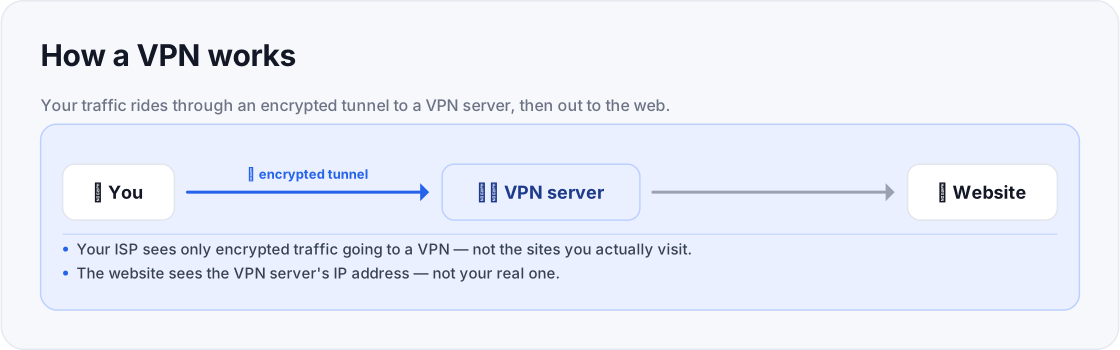
- Anyone in between can see the sites you visit.
- The website sees your real IP address + location.
- ISP / Wi-Fi sees: "encrypted data going to a VPN" (contents hidden)
- Website sees: the VPN server's IP (not your real one)
Key terms, in plain English
| Term | What it means |
|---|---|
| Encryption | Scrambling your data into unreadable code so that anyone who intercepts it sees only gibberish. |
| IP address | Your device's public "return address" on the internet. It reveals your rough location and identifies your connection. |
| VPN server | A remote computer, run by the VPN company, that your traffic passes through so it can borrow that server's IP address. |
| VPN protocol | The rulebook for how the encrypted tunnel is built (common ones include WireGuard, OpenVPN, and IKEv2). |
| VPN client / app | The software on your phone or computer that switches the VPN on and manages the tunnel for you. |
| Tunnel | The protected, encrypted path between your device and the VPN server that the rest of the internet can't see into. |
What a VPN is not (common misconceptions)
Do you actually need one?
- Regularly use public or shared Wi-Fi (cafés, airports, hotels, campuses).
- Want your internet provider to stop logging which sites you visit.
- Need to reach content or services restricted by your region or network.
- Are on a network you don't fully trust and want a baseline of encryption.
- Only browse at home on a network you already trust, over sites that are already encrypted (though many still run one for privacy from their ISP).
- Expect it to speed up a slow connection — routing through an extra server usually costs a little speed, not adds it (see the FAQ).
- Assume it replaces antivirus, a password manager, or two-factor authentication — it complements those, it doesn't replace them.
Frequently asked questions
- Is using a VPN legal?
- In the large majority of countries — including the US, UK, Canada, Australia, the EU, Japan, and South Korea — using a VPN is completely legal. A handful of countries ban them outright (such as North Korea, Belarus, Turkmenistan, Oman, and Myanmar), and a few heavily-censored states like China and Russia restrict them — allowing only government-approved services, or making it illegal to use a VPN to reach blocked sites. A VPN never makes an otherwise-illegal activity legal.
- Should I leave my VPN on all the time?
- For consistent privacy, yes — especially on Wi-Fi you don't control. The trade-off is a small speed cost from encrypting and rerouting your traffic, so some people switch it off for latency-sensitive tasks like competitive gaming.
- Are free VPNs good enough?
- Some reputable providers offer limited free tiers, but "free" services have to make money somehow — occasionally by logging or selling user data. Read the privacy policy before trusting one with your traffic.
- Does a VPN slow down my internet?
- Usually a little, because your data takes a longer, encrypted path through another server. A good provider and a nearby server keep the drop small; we cover this in depth in our guide on whether a VPN slows your internet.
- Can my internet provider still see what I'm doing?
- They can see that you're connected to a VPN and how much data you're moving, but not which specific sites you visit or what's inside the encrypted tunnel.
Where to go next
This article was produced with AI assistance for drafting and research. All facts have been verified and the final content was reviewed and approved by a human editor.
Test Your Knowledge
Enjoying this guide?
TechToolsHQ is an independent, reader-supported tech platform. If this article saved you time, solved a tough problem, or helped you learn a new skill, consider supporting our work. Your support helps us keep our in-depth series 100% free and updated for everyone.
Don't miss the next deep-dive
Weekly breakdowns of the tools students and builders actually use.
No spam·Unsubscribe any time·Privacy-first