What Is a "No-Logs" VPN Policy? (And How to Tell If It's Real)
"No-logs" is the #1 VPN marketing phrase — and the most abused.
By Himanshu Bhatt· 5 min read· August 9, 2026
- A no-logs policy means the VPN provider doesn't record what you do or store data that could identify your activity.
- Distinguish activity logs (sites, files — should never be kept) from connection logs (timestamps, bandwidth — some minimal ones may be operational).
- A VPN can see your traffic, so no-logs is about trusting the provider — which is why it's the core promise.
- The only real proof is an independent third-party audit, not a marketing claim.
- Jurisdiction and technical design (like RAM-only servers) shape how believable the promise is.
On this page(show)(close)
A "no-logs" policy is a VPN provider's promise that it does not record your online activity or keep any data that could be traced back to what you did while connected. It's the single most important promise a VPN makes — because when you use a VPN, you route all of your traffic through that company's servers, so the provider's trustworthiness effectively becomes your privacy.
Here's why the phrase carries so much weight: a VPN doesn't make your traffic vanish, it just changes who can see it. Without a VPN, your internet provider sits in the perfect position to watch where you go. Turn a VPN on and that visibility moves to the VPN company instead. So a no-logs policy isn't a nice-to-have feature — it's the whole reason the trade is worth making. If the provider quietly records everything, you haven't gained privacy; you've just swapped one observer for another.
The two kinds of "logs"
Not all logging is equal, and providers often blur the line on purpose. The important split is between activity logs, which describe what you did, and connection (metadata) logs, which describe how you used the service. A genuine no-logs policy keeps none of the first kind and minimises the second.
| Type | Examples | Should a no-logs VPN keep it? |
|---|---|---|
| Activity (usage) logs | Websites visited, files downloaded, DNS queries, messages, search terms | ❌ Never |
| Connection (metadata) logs | Connection timestamps, session length, bandwidth used, server chosen | ⚠️ Only minimal/aggregated at most, never tied to an individual |
| Personally identifying data | Your real IP at connection time, an account ID linked to sessions | ❌ Should not be linkable to activity |
Why it matters so much
Think of a VPN like a safety-deposit box that you don't own — you rent it, and the company holds a master key. A no-logs policy is that company promising it won't open your box, write down what's inside, or keep a diary of when you visited. That promise is only as good as the company making it, which is exactly why "no-logs" deserves scrutiny rather than blind trust. The claim is easy to print on a homepage and, on its own, impossible for you to see behind.
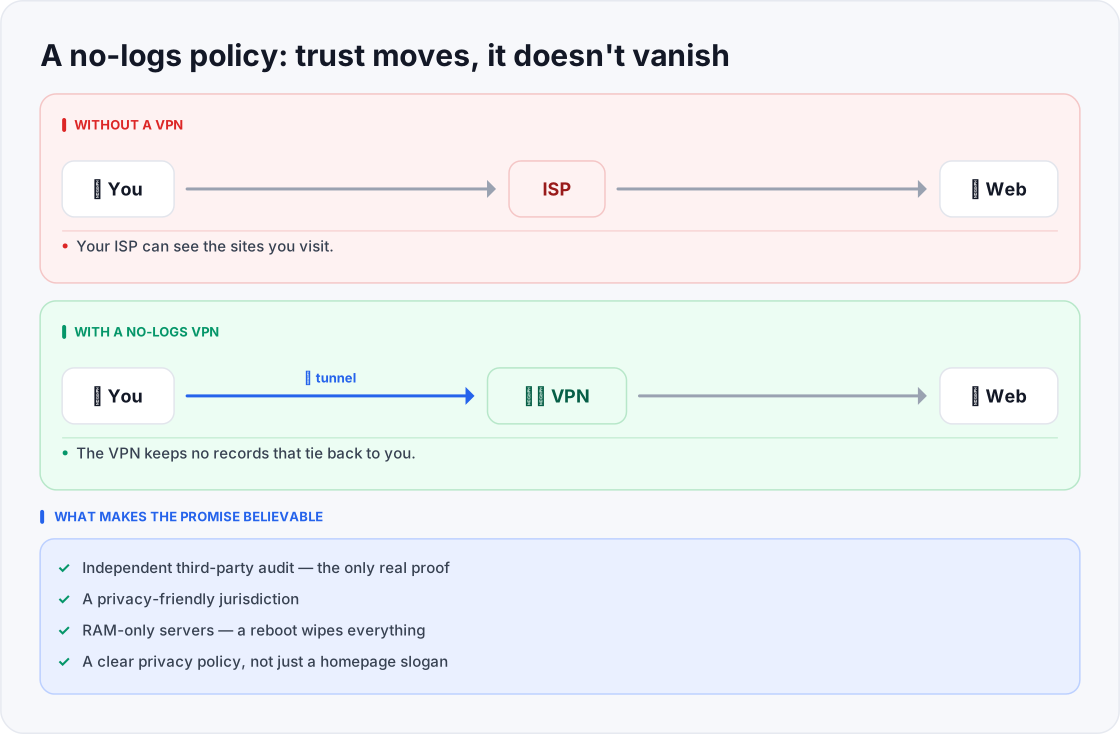
- Your ISP can see the sites you visit.
- The VPN keeps no records that tie back to you.
- Trustworthy only when independently audited.
How to tell a real no-logs policy from a slogan
- 1Look for an independent audit. Reputable providers hire outside firms to inspect their systems and publish the findings. A no-logs claim with no audit behind it is just a sentence on a website.
- 2Read the actual privacy policy, not the marketing banner. Check what it admits to collecting, how long it's kept, and whether anything can be linked to you.
- 3Consider the jurisdiction. The country a provider is based in — and any data-sharing arrangements it participates in — affects what it can be legally compelled to retain or disclose.
- 4Look for supporting technical design, such as RAM-only servers (below) and clear, plain-language transparency reports.
- 5Look for real-world tests — verified cases where a provider's systems were seized or subpoenaed and no useful user data existed.
One technical measure worth understanding is the RAM-only (diskless) server. Ordinary servers save data to hard drives, where it can linger — and be seized — until it's deleted. A RAM-only server holds everything in volatile memory instead, so every reboot wipes the slate completely and there's no long-term store to hand over or steal. It doesn't prove a provider is honest on its own, but it's the kind of design a serious no-logs provider tends to adopt.
Red flags to watch for
- No independent audit — only self-declared claims with nothing to back them.
- A vague or contradictory privacy policy — "we don't log" on the homepage, but the fine print collects plenty.
- A "free" service with no clear business model — running servers costs money; if you're not paying, be sure you understand how they are.
- Marketing that promises total anonymity — an honest provider explains the limits rather than overselling.
Quick glossary
- No-logs policy — a provider's promise not to record your activity or keep any data that identifies what you did online.
- Activity logs — records of what you actually did: the sites you visited, files you downloaded, and queries you made. A genuine no-logs VPN keeps none of these.
- Connection / metadata logs — operational records like timestamps and bandwidth used; minimised and never tied to an individual in a strong policy.
- Independent audit — an outside firm inspecting a provider's systems and publishing whether the no-logs claim actually holds up.
- Jurisdiction — the legal home of a provider, which shapes what it can be forced to retain or disclose.
- RAM-only server — a server that stores data only in memory, so a reboot erases everything and nothing persists to be seized.
- Warrant canary — a public statement a provider updates to signal it has not received secret legal demands.
Frequently asked questions
- Does no-logs mean I'm 100% anonymous?
- No. It means the provider isn't recording your activity, but no VPN makes you fully anonymous — logins, cookies, and fingerprinting still identify you to the websites you use.
- Why would a no-logs VPN keep any data at all?
- Some minimal, aggregated operational data (like total bandwidth) can help run and maintain the service. The line that matters is whether it can be tied back to what you specifically did — it shouldn't be.
- How do I actually verify a no-logs claim?
- Look for a published independent audit, read the privacy policy for what it admits to collecting, and check the provider's jurisdiction. Don't rely on the homepage slogan.
- Is a VPN based in a "privacy-friendly" country automatically safer?
- Jurisdiction helps, but it isn't proof on its own. A strong audit and sound technical design matter more than a flag on the map.
- If I pay for a VPN, does that guarantee no logs?
- No. Paying removes the "you are the product" incentive of some free services, but the only real evidence is an independent audit, not the price tag.
- Can a VPN be forced to start logging me specifically?
- In some jurisdictions a provider can be compelled to monitor a particular user going forward. This is exactly why RAM-only servers, minimal data collection, and a privacy-friendly jurisdiction matter — they limit what even a compelled provider is able to produce.
- Does "no-logs" mean the VPN keeps nothing at all?
- Not usually. Most keep some minimal, aggregated operational data to run the service; the promise is specifically that nothing recorded can be tied back to your individual activity.
- How often should these audits happen?
- It varies by provider, and a single old audit is weaker than a repeated, recent one. Look for the date and scope of the audit, not just the fact that one exists at all.
Where to go next
This article was produced with AI assistance for drafting/research. All facts have been verified and the final content has been reviewed and approved by a human editor.
Test Your Knowledge
Enjoying this guide?
TechToolsHQ is an independent, reader-supported tech platform. If this article saved you time, solved a tough problem, or helped you learn a new skill, consider supporting our work. Your support helps us keep our in-depth series 100% free and updated for everyone.
Don't miss the next deep-dive
Weekly breakdowns of the tools students and builders actually use.
No spam·Unsubscribe any time·Privacy-first