What Is Split Tunneling? (When to Route Around Your VPN)
Split tunneling lets you choose which apps go through the VPN and which connect directly — so you can stream local content or reach home devices while keeping the rest encrypted.
By Himanshu Bhatt· 5 min read· August 9, 2026
- Split tunneling lets you pick which apps or sites use the VPN and which connect directly.
- Handy for reaching local devices (printers, Chromecasts) or local services while the VPN stays on for everything else.
- Two modes: exclusive (VPN by default, exclude a few) or inclusive (direct by default, only chosen apps use the VPN).
- Trade-off: any traffic you route outside the tunnel isn't protected by the VPN.
- Not every VPN or platform supports it, and it can behave differently per device.
On this page(show)(close)
Split tunneling is a VPN feature that lets you decide which of your internet traffic goes through the encrypted VPN tunnel and which connects to the internet directly. Instead of the usual "all or nothing," you split the traffic — for example, routing your web browser through the VPN while letting a banking app or a nearby printer connect normally, outside it.
Picture a two-lane road leaving your house: one lane runs through a guarded, private tunnel, the other is the ordinary open street. Normally a VPN forces every car down the tunnel. Split tunneling lets you wave certain cars — specific apps or destinations — onto the open street instead, while everything else still takes the protected route. It's a convenience feature that trades a slice of protection for flexibility, on purpose and under your control.
Why would anyone want traffic outside the tunnel?
- Reach local devices: printers, Chromecasts, smart-home gear, or a network drive on your home network that a VPN would otherwise hide from your device.
- Avoid VPN hassles for trusted apps: some banking or payment apps flag or block VPN connections; split tunneling lets them connect directly while the rest of your traffic stays protected.
- Keep speed for specific tasks: exclude a latency-sensitive app (like a game or a video call) from the VPN so it isn't slowed by the extra hop, while everything else stays encrypted.
- Mix local and remote: use a local service that only works from your real region while other traffic stays tunneled.
- Work + personal on one device: send work apps through a company VPN (or your own) while personal browsing goes direct, or vice versa.
How it works
In the VPN app's settings, you build a list of apps (or sometimes specific websites or IP ranges) to either include in or exclude from the tunnel. Everything on your "direct" list bypasses the VPN and uses your normal connection; everything else stays inside the encrypted tunnel. The VPN app enforces this by routing each app's traffic down the path you assigned it. Exactly how it's configured — by app, by destination, inclusive vs exclusive lists — varies by provider and by device.
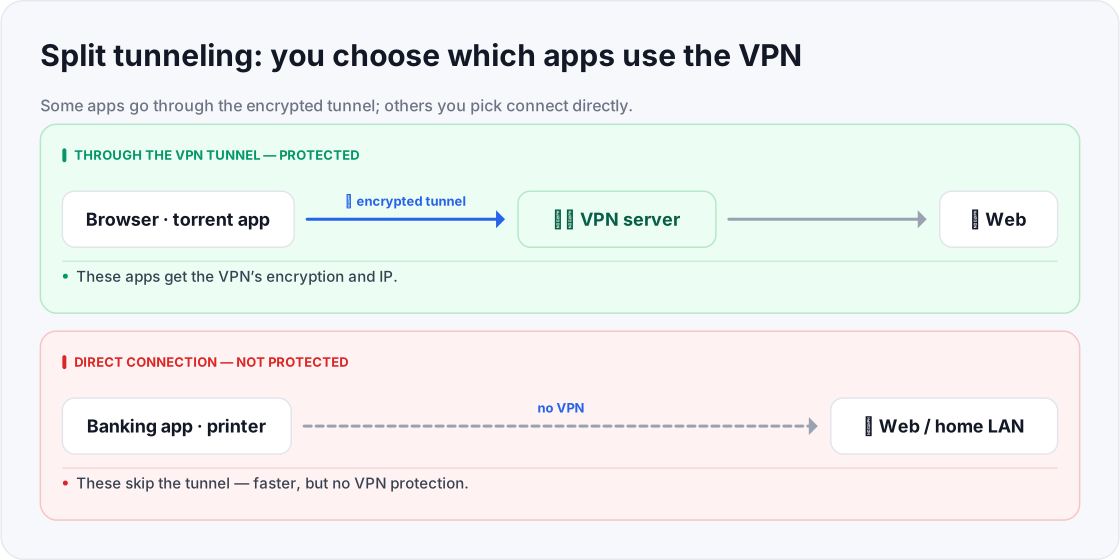
- Every app goes through the encrypted tunnel.
- Protected apps go through the tunnel.
- Banking app and printer connect directly to the internet or home LAN.
- Direct apps skip the tunnel — faster, but not VPN-protected.
Two ways to split: inclusive vs exclusive
- Exclusive mode (VPN by default): everything goes through the VPN except the handful of apps you exclude. Safer default — you only ever punch small holes in your protection. Best when you want privacy for almost everything.
- Inclusive mode (direct by default): everything connects directly except the specific apps you send through the VPN. Best when you only need a couple of apps protected and want full speed for the rest.
Real-world examples
- Printing at home while staying private: keep the VPN on for browsing, but exclude your printer app so your laptop can still find the printer on your local network.
- Banking that dislikes VPNs: exclude your bank's app so it connects directly and doesn't trip its VPN-blocking, while everything else stays encrypted.
- Lag-free gaming: exclude a game from the VPN for the lowest latency, but keep your browser and downloads protected.
- Casting to a TV: exclude the casting app so your phone can reach the Chromecast/smart TV on your home network.
Quick glossary
- Split tunneling — routing some apps or traffic through the VPN while others connect directly.
- VPN tunnel — the encrypted path between your device and the VPN server.
- Exclusive mode — the VPN protects everything except the apps you choose to exclude.
- Inclusive mode — traffic goes direct except the specific apps you send through the VPN.
- Local network (LAN) — the devices on your home network (printers, TVs, drives) that a VPN can otherwise hide from you.
- Per-app routing — assigning individual apps to either the tunnel or the direct path.
- Bypass list — the set of apps or destinations you've told the VPN to route outside the tunnel.
- Real IP — your true public IP, which is exposed for any traffic you route outside the tunnel.
Frequently asked questions
- Is split tunneling safe?
- The tunneled traffic is as protected as ever; the excluded traffic isn't. It's safe as long as you only exclude things you're fine leaving unprotected.
- Does every VPN support it?
- No — support varies by provider and platform. It's more common on desktop and Android than on some other systems.
- Can I split by website instead of by app?
- Some VPNs allow per-site or per-URL rules; others only per-app. It depends on the provider.
- Will split tunneling speed up my connection?
- It can, for the specific apps you route directly, since they skip the encryption and extra hop. But those apps lose VPN protection in exchange.
- Should a beginner turn this on?
- Only if you have a specific reason (a local device, a VPN-averse app). Otherwise, leaving all traffic in the tunnel is the simpler, safer default.
- Does split tunneling work on every device?
- No. It's most common on Windows and Android, less so on some other platforms, and the exact options differ by provider. Check your app before planning around it.
- Is split tunneling the same as a kill switch?
- No — they're almost opposites. A kill switch blocks traffic to keep it protected; split tunneling deliberately lets some traffic out unprotected. You can use both together.
- Will excluding one app expose my whole connection?
- No — only the excluded app's traffic leaves the tunnel. Everything else stays encrypted, so the exposure is limited to exactly what you chose to route directly.
- Can split tunneling break my VPN's privacy?
- Only for the apps you exclude. The real danger is excluding the wrong thing, so never route sensitive activity outside the tunnel just for a little convenience.
Where to go next
This article was produced with AI assistance for drafting/research. All facts have been verified and the final content has been reviewed and approved by a human editor.
Test Your Knowledge
Enjoying this guide?
TechToolsHQ is an independent, reader-supported tech platform. If this article saved you time, solved a tough problem, or helped you learn a new skill, consider supporting our work. Your support helps us keep our in-depth series 100% free and updated for everyone.
Don't miss the next deep-dive
Weekly breakdowns of the tools students and builders actually use.
No spam·Unsubscribe any time·Privacy-first