
What is an attribute?
An attribute is a property that describes an entity. If an entity is a single student, then that student's Roll_no, Name, Age, and Gender are its attributes — the pieces of information we store about it. In an ER diagram, the entity set is drawn as a rectangle and each of its attributes is drawn as an oval joined to that rectangle by a line.

- Roll_no is the key attribute, so it is underlined.
- Name, DOB and Gender are drawn as plain ovals.
- Age is derived from DOB, so it is drawn as a dashed oval.
- Mobile_no can hold several numbers, so it is drawn as a double oval.
The six types of attributes
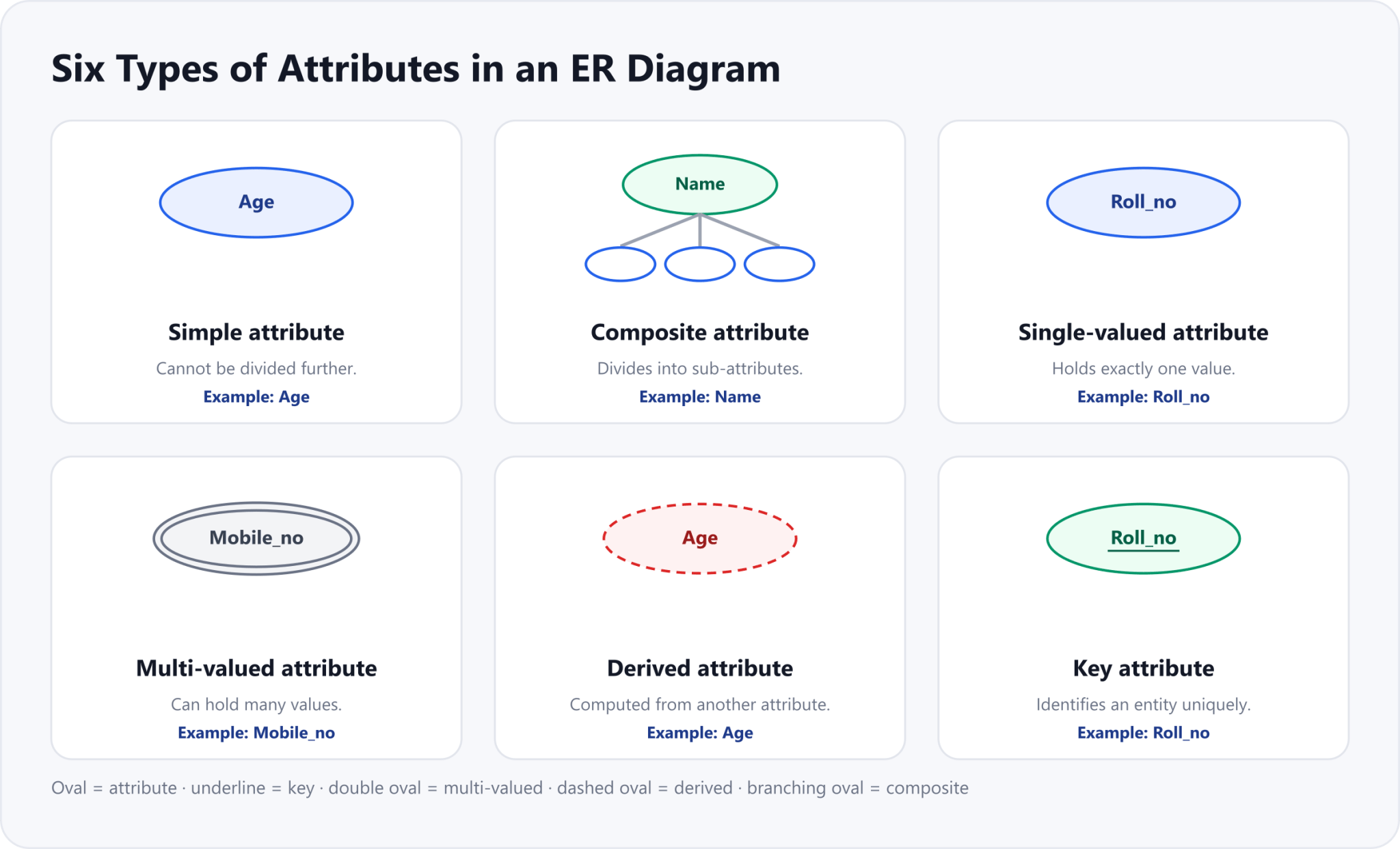
Attributes are grouped by how they behave. There are six common types: simple, composite, single-valued, multi-valued, derived, and key. It helps to know that these describe different properties rather than six separate boxes — so one attribute can be several of them at the same time. Age, for example, is simple, single-valued, and derived all at once. The diagram below shows the notation for each type.
Simple and composite attributes
A simple (or atomic) attribute cannot be divided into smaller parts — Roll_no, Age, and Gender are simple because each is already a single, whole value. A composite attribute can be split into smaller sub-attributes. Name is composite because it divides into First_name, Middle_name, and Last_name, and Address is composite because it divides into Street, City, State, and Country.
- Simple attribute: cannot be divided further — for example, Roll_no, Age, Gender.
- Composite attribute: divides into sub-attributes — for example, Name (First, Middle, Last) or Address (Street, City, State, Country).
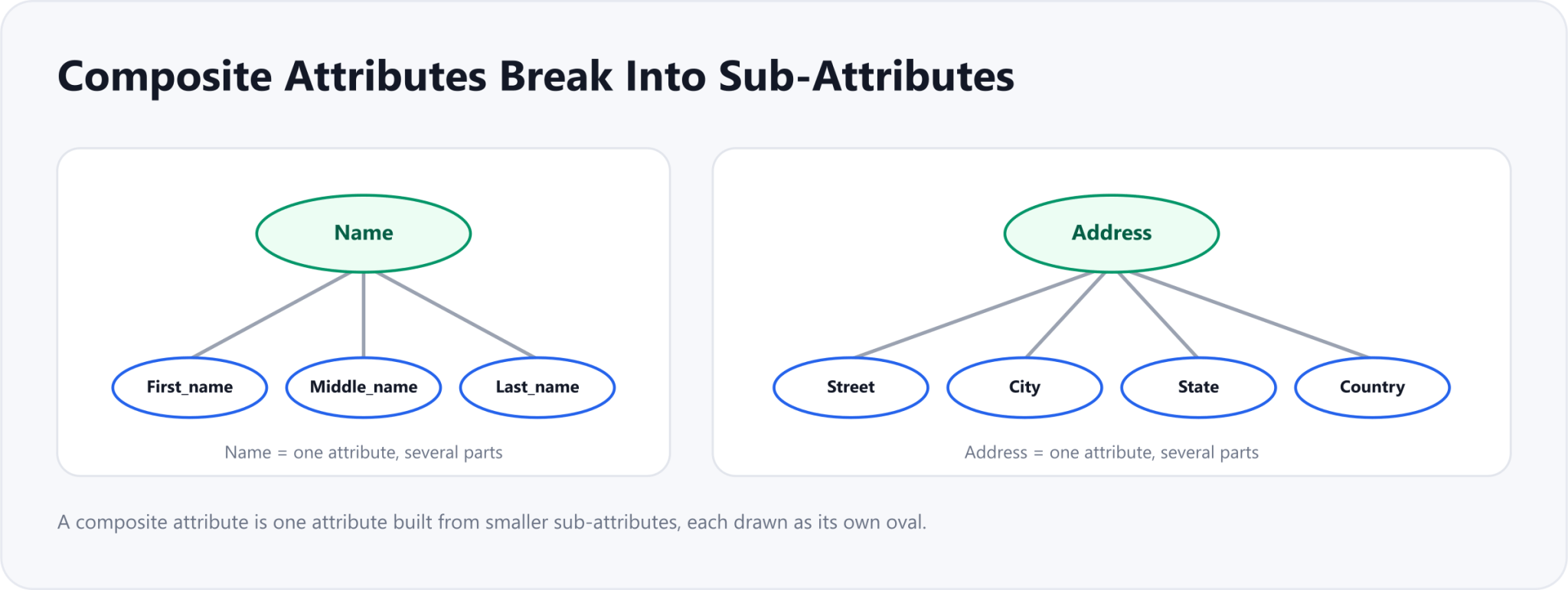
- A composite attribute is one attribute made of smaller sub-attributes.
- Name breaks into First_name, Middle_name and Last_name.
- Address is another example: Street, City, State, Country.
- Each sub-attribute is drawn as its own oval joined to the parent.
Single-valued and multi-valued attributes
A single-valued attribute can hold only one value for a given entity. A student has exactly one Roll_no, one Date of Birth, and one Gender, so these are single-valued. A multi-valued attribute can hold more than one value for the same entity. A student may have several phone numbers or email addresses, so Mobile_no and Email_id are multi-valued. In an ER diagram, a multi-valued attribute is drawn as a double oval.
- Single-valued attribute: takes exactly one value per entity — for example, Roll_no, DOB, Gender.
- Multi-valued attribute: can take more than one value per entity — for example, Mobile_no, Email_id. Drawn as a double oval.
Derived attributes
A derived attribute is one whose value can be worked out from another attribute instead of being stored on its own. Age is the classic example: rather than store a student’s age (which would need updating every year), we store the Date of Birth and compute Age from it whenever we need it. In an ER diagram, a derived attribute is drawn as a dashed oval.

Key attributes
A key attribute is an attribute whose value identifies an entity uniquely within its entity set. No two students share the same Roll_no, so Roll_no is a key attribute for the Student entity set. In an ER diagram, a key attribute is shown by underlining its name inside the oval. This is the ER-diagram view of the primary key we met in Part 2.
| Attribute type | What it means | ER notation | Example |
|---|---|---|---|
| Simple | Cannot be split into smaller parts | Oval | Age |
| Composite | Made of smaller sub-attributes | Oval branching into ovals | Name |
| Single-valued | Holds exactly one value | Oval | Roll_no |
| Multi-valued | Can hold more than one value | Double oval | Mobile_no |
| Derived | Computed from another attribute | Dashed oval | Age (from DOB) |
| Key | Uniquely identifies an entity | Underlined oval | Roll_no |
With entities, relationships, and now attributes in hand, you can describe exactly what data an ER diagram holds. Next in the series we look at how entities relate in numbers — the cardinality of a relationship.
Drafted with AI assistance from an author outline and edited by TechToolsHQ.