Are Free VPNs Safe? What to Check Before You Install One
Mostly no — but not always.
By Himanshu Bhatt· August 17, 2026

Prerequisites & What You Need Before Starting
- Know what a VPN is and what a VPN does NOT protect you from
- A web browser open with a neutral leak-test site (e.g., dnsleaktest.com or ipleak.net)
- 10 minutes to review the provider's website, audit history, and app store permissions
- Most free VPNs are risky: a 2026 study of 281 free Android VPNs found widespread leaks, weak encryption, and tracking.
- The safe exceptions are usually free tiers from reputable, audited paid providers — not anonymous standalone apps.
- Ask the key question: "how does this free VPN make money?" If the answer is your data, walk away.
- Vet on business model, audits, encryption, leaks, and permissions before installing.
- One failed check is enough to disqualify an app.
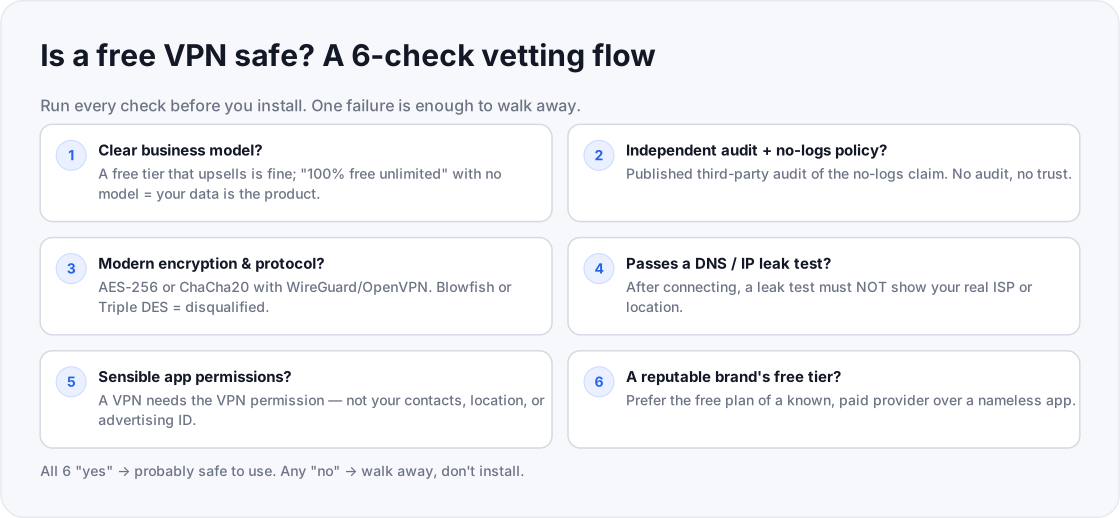
"Free" VPNs range from genuinely safe (a reputable provider's free tier) to actively harmful (data-harvesting apps). This guide gives you a checklist to tell them apart before you install anything.
Ask the monetization question: how does the service make money?
Running servers and bandwidth costs real money. Look for an honest, visible business model (such as a limited free tier designed to upsell to a paid subscription). If an anonymous app promises 100% free, unlimited service with no paid plan, walk away — your data and ad tracking are paying the bills.
Verify a published, third-party no-logs audit
Insist on an independent audit report from an established cybersecurity firm (e.g., Cure53, PwC, Deloitte) confirming that user traffic is not logged. Do not rely on unverified marketing claims on the homepage; read the actual privacy policy to see what data is collected.
Check the encryption cipher and VPN protocol
Confirm the service uses modern industry-standard protocols (WireGuard or OpenVPN) paired with strong ciphers (AES-256 or ChaCha20). Disqualify any app that relies on obsolete ciphers (Blowfish, Triple DES, PPTP) or offers unencrypted fallback modes.
Perform live DNS, WebRTC, and IPv6 leak tests
Connect to the VPN and immediately run diagnostic tests on neutral leak-testing sites (dnsleaktest.com, browserleaks.com/dns, ipleak.net). If the test reveals your true ISP name, real IP address, or local DNS servers, the tunnel is leaking and must be uninstalled.
Inspect mobile app permissions and background trackers
A legitimate VPN client only requires the standard OS VPN connection profile permission. If an app requests access to contacts, precise GPS location, SMS, storage, or device advertising IDs, it is harvesting user data.
Stick to established, reputable brand free tiers
Choose the capped free plan of a well-known, accountable privacy company with an established track record over an unknown standalone utility. Accept speed or data caps as a reasonable trade-off for verified security and transparent operations.
On this page(show)(close)
"Free" is doing a lot of work in the phrase "free VPN." At one end are the genuinely safe options — the limited free tiers of reputable, paid providers. At the other are data-harvesting apps that are worse than using no VPN at all: a 2026 academic study of 281 free Android VPNs found the majority leaked traffic, used weak or no encryption, or quietly contacted advertising and tracking servers. The good news is you don't have to guess. This guide is a six-check vetting flow you can run in about ten minutes before you install anything.
Step 1: Start with the money question
Running a VPN — servers, bandwidth, engineers — costs real money, so the first question for any free app is simple: how does it pay for itself? A reputable company offering a limited free tier to upsell you to a paid plan has an honest, visible business model. An anonymous "100% free, unlimited" app with no company behind it and no paid product does not — and the 2026 study suggests where the money often comes from: monetizing the very browsing activity a VPN is supposed to hide. If you can't answer "how do they make money?" without the answer being "my data," that's your first red flag.
Step 2: Look for an independent audit and a no-logs policy
The safe free options are almost always the free tiers of providers that publish independent, third-party audits of their no-logs claims. An audit means an outside firm inspected their systems and confirmed they don't record what you do. A no-logs promise with no audit behind it is just a sentence on a website. Read the actual privacy policy too — not the homepage banner — and check what it admits to collecting.
Step 3: Check the encryption and protocol
Insist on modern encryption — AES-256 or ChaCha20 — carried by a modern protocol like WireGuard or OpenVPN. These are the standards reputable providers use. The 2026 study flagged free apps still using broken or outdated ciphers such as Blowfish and Triple DES, and some that set the cipher to "none" at all. Any of those is an instant disqualifier: weak encryption is a false sense of security, which is arguably worse than none.
Step 4: Test for leaks
A VPN that leaks your DNS requests or your real IP address is broadcasting exactly what it's supposed to hide. After connecting to the free VPN, run a reputable leak test — well-established options include dnsleaktest.com, browserleaks.com/dns, and ipleak.net. If the results show your real ISP or your real location instead of the VPN's, the app is leaking. Uninstall it. Leaks were among the most common and damaging failures the study found.
Step 5: Read the app permissions and privacy policy
On mobile especially, a VPN should request the VPN permission and little else. Be wary of a free VPN that asks for access it has no reason to need — your contacts, precise location, SMS, or the like. The 2026 study documented apps transmitting the device Advertising ID and, in at least one case, exact GPS coordinates. Overreaching permissions are a strong signal the app's real product is you.
Step 6: Prefer a known brand's free tier
When in doubt, choose the free plan of a provider with a real reputation and a paid business over a nameless "free unlimited VPN." An established company has something to lose by mishandling your data; an anonymous app does not. A free tier will usually cap your data or server choices — that limitation is the honest trade for a service that isn't monetizing your traffic.
How to know it's safe (verification)
You've vetted the app correctly when you can answer yes to all six checks: it has a clear business model, a published independent audit and no-logs policy, modern encryption, a clean leak test, minimal permissions, and a reputable name behind it. If even one check fails — no audit, a leak, weak crypto, greedy permissions — stop and pick something else. In vetting a free VPN, one red flag outweighs five green ones.
Frequently asked questions
- Are all free VPNs unsafe?
- No, but most of the ones tested in 2026 had serious problems. The safe ones are usually free tiers of reputable, audited providers rather than standalone "free" apps.
- What's the catch with a free VPN?
- Usually your data — free apps often monetize your browsing through ads and trackers, which is the opposite of privacy.
- Is a paid VPN always safer than a free one?
- Not automatically, but paying removes the incentive to sell your data, and the best paid providers publish independent audits of their no-logs claims.
- The free VPN passed a leak test once — am I safe?
- Re-test after app or OS updates and on the different networks you use (including mobile data). A one-time pass isn't a permanent guarantee.
- Is a browser's built-in "free VPN" safe?
- Many are really proxies that only cover that browser and may not encrypt everything. Apply the same six checks, and confirm it protects your whole connection, not just the browser tab.
Where to go next
Drafted with AI assistance, verified against the cited study and primary sources, and edited by TechToolsHQ staff.
Enjoying this guide?
TechToolsHQ is an independent, reader-supported tech platform. If this article saved you time, solved a tough problem, or helped you learn a new skill, consider supporting our work. Your support helps us keep our in-depth series 100% free and updated for everyone.
Get buying guides in your inbox
Practical, no-hype guides to choosing the right tech.
No spam·Unsubscribe any time·Privacy-first